
Qt Quick 3D - 用户通行证示例
演示如何在Qt Quick 3D 中创建自定义渲染通道。
}
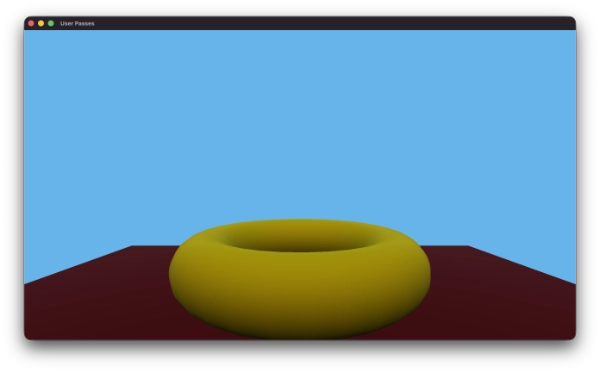
“用户渲染通道”示例演示了如何在Qt Quick 3D 中创建自定义渲染通道。该示例通过多个用户定义的渲染通道实现了延迟光照渲染管线,并展示了如何处理完整的渲染序列:不透明几何体、天空盒、嵌入场景中的2D元素以及透明几何体。
禁用内部渲染通道
默认情况下,Qt Quick 3D 使用一组内部渲染通道来渲染 3D 场景。有时,您可能希望禁用这些内部渲染通道,并使用用户定义的渲染通道来实现自己的渲染管线。
要禁用内部渲染通道,请将View3D 的renderOverrides 属性设置为View3D.DisableInternalPasses 。
View3D {
    id: view3D
    anchors.fill: parent
    renderOverrides: View3D.DisableInternalPasses
    environment: ExtendedSceneEnvironment {
        lightProbe: Texture {
            textureData: ProceduralSkyTextureData {
            }
        }
        backgroundMode: SceneEnvironment.SkyBox
}如果禁用了内部渲染通道,您需要提供主颜色通道的结果,以便View3D 能够在屏幕上显示任何内容。
几何缓冲区渲染通道
在此示例中,第一个自定义渲染通道是一个几何缓冲区(G-buffer)通道,它将场景几何体渲染到多个渲染目标中,并在每个目标中存储不同的材质属性。提供的示例是Qt Quick 3D 材质所提供完整材质属性的子集,重点在于实现基本延迟照明所需的属性。
我们的RenderPass 定义在GBufferPass.qml 中:
RenderPass {
    id: gbufferPass
    clearColor: Qt.rgba(0.0, 0.0, 0.0, 0.0)

    property alias layerMask: filter.layerMask
    required property RenderPassTexture depthTexture

    RenderPassTexture {
        id: gbuffer0
        format: RenderPassTexture.RGBA16F
        // rgb: baseColor (linear), a: metalness
    }

    RenderPassTexture {
        id: gbuffer1
        format: RenderPassTexture.RGBA16F
        // rgb: normal, a: roughness
    }

    RenderPassTexture {
        id: gbuffer2
        format: RenderPassTexture.RGBA16F
        // rgb: emissive, a: ao/spare
    }

    commands: [
        ColorAttachment { target: gbuffer0; name: "GBUFFER0" },
        ColorAttachment { target: gbuffer1; name: "GBUFFER1" },
        ColorAttachment { target: gbuffer2; name: "GBUFFER2" },
        DepthTextureAttachment { target: gbufferPass.depthTexture },
        RenderablesFilter {
            id: filter
            renderableTypes: RenderablesFilter.Opaque
        }
    ]

    materialMode: RenderPass.AugmentMaterial
    augmentShader: "gbuffer_augment.glsl"
}
它定义了 3 个颜色附件和 1 个深度附件。该渲染通道需要 3 张纹理,这些纹理在RenderPass 中被定义为RenderPassTexture 对象。这 3 张 RenderPassTextures 将作为该渲染通道颜色附件的目标,而深度附件则使用来自渲染通道外部的深度纹理。
RenderPass 本身设置为AugmentMaterial 模式,这意味着它将通过额外的着色器代码对渲染对象的材质进行增强。增强着色器位于gbuffer_augment.glsl 文件中,该文件将所需的材质属性输出到多个渲染目标中。
void MAIN_FRAGMENT_AUGMENT()
{
    vec3 baseColor   = BASE_COLOR.rgb;
    float metalness  = METALNESS;
    float roughness  = ROUGHNESS;
    vec3 worldNormal = normalize(WORLD_NORMAL);

    // GBuffer 0: albedo + metalness
    GBUFFER0 = vec4(baseColor, metalness);

    // GBuffer 1: normal (encoded to 0..1) + roughness
    GBUFFER1 = vec4(worldNormal * 0.5 + 0.5, roughness);

    // GBuffer 2: world position
    GBUFFER2 = vec4(qt_varWorldPos, 1.0);
}
此处展示了基础颜色、金属度、世界法线、粗糙度以及世界位置如何被存储到 G-缓冲区的 3 个颜色附件中。
要在渲染管道中实际使用 G-buffer 渲染阶段,我们需要在 `Main.qml` 中创建其实例,并提供所需的深度纹理:
RenderPassTexture {
    id: mainDepthStencilTexture
    format: RenderPassTexture.Depth24Stencil8
}
GBufferPass {
    id: gbufferPass
    layerMask: ContentLayer.Layer0 | ContentLayer.Layer1
    depthTexture: mainDepthStencilTexture
}

RenderOutputProvider {
    id: gbuffer0Provider
    textureSource: RenderOutputProvider.UserPassTexture
    renderPass: gbufferPass
    attachmentSelector: RenderOutputProvider.Attachment0
}

RenderOutputProvider {
    id: gbuffer1Provider
    textureSource: RenderOutputProvider.UserPassTexture
    renderPass: gbufferPass
    attachmentSelector: RenderOutputProvider.Attachment1
}

RenderOutputProvider {
    id: gbuffer2Provider
    textureSource: RenderOutputProvider.UserPassTexture
    renderPass: gbufferPass
    attachmentSelector: RenderOutputProvider.Attachment2
}创建了三个RenderOutputProvider 实例,用于提供对渲染后G-buffer纹理的引用,这些纹理将在后续的光照通道中使用。
G-缓冲区渲染通道的layerMask 属性被设置为仅渲染位于ContentLayer.Layer0和ContentLayer.Layer1上的对象。这使我们能够通过相应地设置对象的layers 属性,来控制哪些对象会在G-缓冲区渲染通道中被渲染。
主颜色渲染通道和子渲染通道
本示例并非采用单一的扁平化渲染阶段,而是使用了一个复合渲染器(mainColorPass ),该渲染器拥有主颜色和深度纹理,并通过一系列SubRenderPass 子节点来协调所有渲染操作。
每个SubRenderPass 与外层渲染通道共享相同的渲染目标,并按顺序执行。这使得构建分层渲染管线变得非常简单,每个阶段都会在前一阶段结果的基础上进行叠加。
RenderPass {
    id: mainColorPass
    clearColor: "black"
    // Preserve depth across SubRenderPasses so geometry depth is available
    // when rendering the skybox, transparent objects, and 2D items.
    renderTargetFlags: RenderPass.RenderTargetFlags.PreserveDepthStencilContents

    commands: [
        ColorAttachment {
            target: mainColorTexture
        },
        DepthTextureAttachment {
            target: mainDepthStencilTexture
        },
        RenderablesFilter {
            // Nothing renders directly in the outer pass; all rendering
            // is delegated to the SubRenderPasses below.
            renderableTypes: RenderablesFilter.None
        },

        // 1. Deferred lighting: shade opaque geometry stored in the G-buffer.
        SubRenderPass {
            renderPass: RenderPass {
                id: deferredLightingPass
                materialMode: RenderPass.OriginalMaterial
                commands: [
                    PipelineStateOverride {
                        // The full-screen quad must not write or test depth;
                        // geometry depth was already written by the G-buffer pass.
                        depthWriteEnabled: false
                        depthTestEnabled: false
                    },
                    RenderablesFilter { layerMask: ContentLayer.Layer13 }
                ]
            }
        },

        // 2. Skybox: render the environment behind all scene geometry.
        SubRenderPass {
            renderPass: RenderPass {
                id: skyboxPass
                passMode: RenderPass.SkyboxPass
                commands: [
                    PipelineStateOverride {
                        // The skybox is rendered "at infinity" so it must
                        // depth-test (to be hidden by geometry) but must not
                        // write depth.
                        depthTestEnabled: true
                        depthWriteEnabled: false
                    }
                ]
            }
        },

        // 3. 2D items: render any Qt Quick Items embedded in the 3D scene.
        SubRenderPass {
            renderPass: RenderPass {
                id: item2DPass
                passMode: RenderPass.Item2DPass
            }
        },

        // 4. Transparent objects: render blended geometry on top of everything else.
        SubRenderPass {
            renderPass: RenderPass {
                id: transparentItemPass
                materialMode: RenderPass.OriginalMaterial
                commands: [
                    RenderablesFilter {
                        renderableTypes: RenderablesFilter.Transparent
                        layerMask: ContentLayer.Layer0 | ContentLayer.Layer1
                    },
                    PipelineStateOverride {
                        // Enable alpha blending and depth testing so transparent
                        // objects sort correctly against opaque geometry.
                        blendEnabled: true
                        depthTestEnabled: true
                        targetBlend0.enable: true
                        targetBlend0.srcColor: RenderTargetBlend.SrcAlpha
                        targetBlend0.dstColor: RenderTargetBlend.OneMinusSrcAlpha
                        targetBlend0.srcAlpha: RenderTargetBlend.One
                        targetBlend0.dstAlpha: RenderTargetBlend.OneMinusSrcAlpha
                    }
                ]
            }
        }
    ]
}外层渲染通道将renderableTypes:RenderablesFilter 设置为 .None,以确保在父级通道中不进行任何直接渲染——所有渲染任务均委托给子通道。PreserveDepthStencilContents 标志可确保G-缓冲区通道写入的深度值可供每个子通道使用。
延迟照明子通道
第一个子通道执行延迟光照计算。它渲染全屏的deferredLightingQuad 模型,该模型会采样G-buffer纹理并为每个像素计算光照。
Model {
    id: deferredLightingQuad
    layers: ContentLayer.Layer13
    castsShadows: false
    receivesShadows: false
    geometry: PlaneGeometry {
        // geometry doesn't matter, just need 4 verts
        plane: PlaneGeometry.XY
    }
    materials: [
        CustomMaterial {
            id: lightingPassMaterial
            property TextureInput gbuffer0: TextureInput {
                enabled: true
                texture: Texture {
                    textureProvider: gbuffer0Provider
                }
            }
            property TextureInput gbuffer1: TextureInput {
                enabled: true
                texture: Texture {
                    textureProvider: gbuffer1Provider
                }
            }
            property TextureInput gbuffer2: TextureInput {
                enabled: true
                texture: Texture {
                    textureProvider: gbuffer2Provider
                }
            }
            shadingMode: CustomMaterial.Unshaded
            fragmentShader: "lighting.frag"
            vertexShader: "lighting.vert"
        }
    ]
}该deferredLightingQuad 被放置在ContentLayer.Layer13 上,这样它对G-缓冲区渲染阶段不可见,仅由该子渲染阶段进行渲染。
PipelineStateOverride 会禁用该四边形的深度写入和深度测试。由于G-缓冲区渲染阶段已为场景几何体写入了正确的深度值,因此全屏四边形绝不能修改或测试深度。
天空盒子子渲染通道
第二个子渲染通道使用特殊的RenderPass.SkyboxPass 渲染模式来渲染场景环境的天空盒。Qt Quick 3D 会根据SceneEnvironment 中的lightProbe 和backgroundMode 设置来绘制天空盒几何体。
PipelineStateOverride 启用了深度测试,因此天空盒会正确地隐藏在场景几何体之后;同时禁用了深度写入,因为天空盒位于“无限远”处,绝不能遮挡几何体。
透明物体子渲染通道
透明物体无法存储在 G-缓冲区中,因为它们需要按从后到前的顺序进行混合。因此,它们会通过一个专用的子渲染通道,使用原始材质作为最后一步进行渲染。
场景中的透明圆锥声明如下:
Model {
    id: cone
    layers: ContentLayer.Layer1
    source: "#Cone"
    y: 100
    materials: [
        PrincipledMaterial {
            baseColor: Qt.rgba(0.0, 1.0, 0.0, 0.5)
            alphaMode: PrincipledMaterial.Blend
            metalness: 0.0
            roughness: 0.5
        }
    ]
}透明子通道使用RenderablesFilter 来仅选择匹配图层上的透明渲染对象,并使用PipelineStateOverride 启用Alpha混合,同时保持深度测试有效,以确保透明物体相对于不透明几何体能正确排序。
透明物体必须在所有不透明渲染通道之后进行渲染,以确保在混合操作发生前深度缓冲区已完全填充。
3D 子通道中的 2D 对象
Qt Quick 3D 可利用Node 作为容器,将标准的Qt Quick 2D项嵌入3D场景中。若要将这些项纳入自定义渲染管线,请添加一个使用passMode 的子通道:RenderPass.Item2DPass。
Node {
    x: -200
    y: 100

    Item {
        anchors.centerIn: parent
        ColumnLayout {
            Button {
                text: "Click Me!"
            }
            Rectangle {
                color: "blue"
                implicitWidth: 50
                implicitHeight: 50

                NumberAnimation on rotation {
                    from: 0
                    to: 360
                    duration: 4000
                    loops: Animation.Infinite
                    running: true
                }
            }
        }
    }

    NumberAnimation on eulerRotation.y {
        from: 0
        to: 360
        duration: 6000
        loops: Animation.Infinite
        running: true
    }
}
Item2DPass 模式会指示Qt Quick 3D 将所有作为3D节点子节点的Qt Quick 对象渲染到当前渲染目标中,并与现有的3D内容进行合成。
渲染到屏幕上
最后,为了将自定义渲染通道的结果显示在屏幕上,我们需要确保View3D 的主颜色纹理已更新为主颜色通道的结果。
SimpleQuadRenderer {
    texture: Texture {
        textureProvider: mainColorPassProvider
    }
}

RenderPassTexture {
    id: mainColorTexture
    format: RenderPassTexture.RGBA16F
}

RenderOutputProvider {
    id: mainColorPassProvider
    textureSource: RenderOutputProvider.UserPassTexture
    renderPass: mainColorPass
    attachmentSelector: RenderOutputProvider.Attachment0
}
SimpleQuadRenderer 用于将mainColorPass 生成的主颜色纹理复制到View3D 的帧缓冲区中。RenderOutputProvider 将mainColorPass 的第一个颜色附件作为纹理暴露出来,以便SimpleQuadRenderer 可以对其进行采样。
© 2026 The Qt Company Ltd. Documentation contributions included herein are the copyrights of their respective owners. The documentation provided herein is licensed under the terms of the GNU Free Documentation License version 1.3 as published by the Free Software Foundation. Qt and respective logos are trademarks of The Qt Company Ltd. in Finland and/or other countries worldwide. All other trademarks are property of their respective owners.
