Qt Quick 3D 物理学 - 自定义形状示例
演示了如何使用不同的形状。
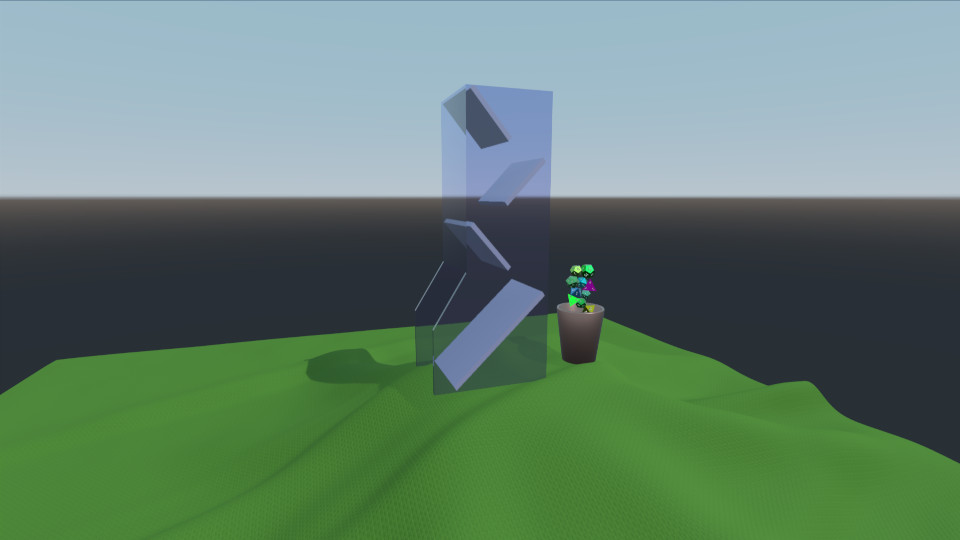
本示例演示了加载和生成多个刚体网格,以及对其进行动画处理。场景由一个骰子塔、一张桌布、一个杯子以及一把骰子组成。杯子会通过动画将生成的骰子收集起来并放入骰子塔中。随后,骰子会从骰子塔中滚落,散落在桌布上。
环境
与往常一样,我们有一个PhysicsWorld 和一个View3D 。在View3D 中,我们定义了环境,并设置了一个光探针:
environment: SceneEnvironment {
    clearColor: "white"
    backgroundMode: SceneEnvironment.SkyBox
    antialiasingMode: SceneEnvironment.MSAA
    antialiasingQuality: SceneEnvironment.High
    lightProbe: proceduralSky
}
纹理
我们定义了四张纹理,分别用于天空盒、桌布以及骰子上的数字:
Texture {
    id: proceduralSky
    textureData: ProceduralSkyTextureData {
        sunLongitude: -115
    }
}

Texture {
    id: weaveNormal
    source: "maps/weave.png"
    scaleU: 200
    scaleV: 200
    generateMipmaps: true
    mipFilter: Texture.Linear
}
Texture {
    id: numberNormal
    source: "maps/numbers-normal.png"
}

Texture {
    id: numberFill
    source: "maps/numbers.png"
    generateMipmaps: true
    mipFilter: Texture.Linear
}
场景
我们有一个 Node,其中包含我们的场景,内含摄像机和一盏定向光:
id: scene
scale: Qt.vector3d(2, 2, 2)
PerspectiveCamera {
    id: camera
    position: Qt.vector3d(-45, 25, 60)
    eulerRotation: Qt.vector3d(-6, -33, 0)
    clipFar: 1000
    clipNear: 0.1
}

DirectionalLight {
    eulerRotation: Qt.vector3d(-45, 25, 0)
    castsShadow: true
    brightness: 1
    shadowMapQuality: Light.ShadowMapQualityHigh
    pcfFactor: 0.1
    shadowBias: 1
}
桌布
我们添加了桌布,它是一个StaticRigidBody ,由带有编织纹理的模型和用于碰撞检测的HeightFieldShape 组成。
StaticRigidBody {
    position: Qt.vector3d(-15, -8, 0)
    id: tablecloth

    Model {
        geometry: HeightFieldGeometry {
            id: tableclothGeometry
            extents: Qt.vector3d(150, 20, 150)
            source: "maps/cloth-heightmap.png"
            smoothShading: false
        }
        materials: PrincipledMaterial {
            baseColor: "#447722"
            roughness: 0.8
            normalMap: weaveNormal
            normalStrength: 0.7
        }
    }

    collisionShapes: HeightFieldShape {
        id: hfShape
        extents: tableclothGeometry.extents
        source: "maps/cloth-heightmap.png"
    }
}
杯子
我们将杯子定义为一个DynamicRigidBody ,包含一个模型和一个用作碰撞形状的TriangleMeshShape 。由于eulerRotation 和position 属性属于动画的一部分,因此为其设置了行为。
DynamicRigidBody {
    id: diceCup
    isKinematic: true
    mass: 0
    property vector3d bottomPos: Qt.vector3d(11, 6, 0)
    property vector3d topPos: Qt.vector3d(11, 45, 0)
    property vector3d unloadPos: Qt.vector3d(0, 45, 0)
    position: bottomPos
    kinematicPivot: Qt.vector3d(0, 6, 0)
    kinematicPosition: bottomPos
    collisionShapes: TriangleMeshShape {
        id: cupShape
        source: "meshes/simpleCup.mesh"
    }
    Model {
        source: "meshes/cup.mesh"
        materials: PrincipledMaterial {
            baseColor: "#cc9988"
            roughness: 0.3
            metalness: 1
        }
    }
}
塔
塔体仅是一个StaticRigidBody ,带有Model以及用于碰撞的TriangleMeshShape 。
StaticRigidBody {
    id: diceTower
    x: -4
    Model {
        id: testModel
        source: "meshes/tower.mesh"
        materials: [
            PrincipledMaterial {
                baseColor: "#ccccce"
                roughness: 0.3
            },
            PrincipledMaterial {
                id: glassMaterial
                baseColor: "#aaaacc"
                transmissionFactor: 0.95
                thicknessFactor: 1
                roughness: 0.05
            }
        ]
    }
    collisionShapes: TriangleMeshShape {
        id: triShape
        source: "meshes/tower.mesh"
    }
}
骰子
为了生成骰子,我们使用了一个组件,其中包含自定义的 Die QML 对象和一个Repeater3D 。
Component {
    id: diceComponent
    Die {}
}

Repeater3D {
    id: dicePool
    model: 25
    delegate: diceComponent
    delegateModelAccess: DelegateModel.ReadWrite
    function restore() {
        for (let i = 0; i < count; i++) {
            (objectAt(i) as Die).restore()
        }
    }
}
Die 对象包含一个带有ConvexMeshShape 和Model的DynamicRigidBody 。每个骰子的位置、颜色、缩放比例和网格源都是随机生成的。
DynamicRigidBody {
    id: thisBody
    required property int index

    Texture {
        id: numberNormal
        source: "maps/numbers-normal.png"
    }

    Texture {
        id: numberFill
        source: "maps/numbers.png"
        generateMipmaps: true
        mipFilter: Texture.Linear
    }

    function randomInRange(min, max) {
        return Math.random() * (max - min) + min
    }

    function restore() {
        reset(initialPosition, eulerRotation)
    }

    scale: Qt.vector3d(scaleFactor, scaleFactor, scaleFactor)
    eulerRotation: Qt.vector3d(randomInRange(0, 360),
                               randomInRange(0, 360),
                               randomInRange(0, 360))

    property vector3d initialPosition: Qt.vector3d(11 + 1.5 * Math.cos(index/(Math.PI/4)),
                                                   6 + index * 1.5,
                                                   0)
    position: initialPosition

    property real scaleFactor: randomInRange(0.8, 1.4)
    property color baseCol: Qt.hsla(randomInRange(0, 1),
                                    randomInRange(0.6, 1.0),
                                    randomInRange(0.4, 0.7),
                                    1.0)

    collisionShapes: ConvexMeshShape {
        id: diceShape
        source: Math.random() < 0.25 ? "meshes/icosahedron.mesh"
              : Math.random() < 0.5 ? "meshes/dodecahedron.mesh"
              : Math.random() < 0.75 ? "meshes/octahedron.mesh"
                                     : "meshes/tetrahedron.mesh"
    }

    Model {
        id: thisModel
        source: diceShape.source
        receivesShadows: false
        materials: PrincipledMaterial {
            metalness: 1.0
            roughness: thisBody.randomInRange(0.2, 0.6)
            baseColor: thisBody.baseCol
            emissiveMap: numberFill
            emissiveFactor: Qt.vector3d(1, 1, 1)
            normalMap: numberNormal
            normalStrength: 0.75
        }
    }
}
动画
为了让骰子从杯中移至骰塔,我们对杯子进行动画处理:先将其向上移动,然后倾倒。为确保动画与物理模拟保持同步,我们使用AnimationController ,并将其连接到PhysicsWorld 上的onFrameDone 信号。在每个模拟帧结束后,我们会根据已过去的时间步长推进动画。
Connections {
    target: physicsWorld
    property real totalAnimationTime: 7500
    function onFrameDone(timeStep) {
        let progressStep = timeStep / totalAnimationTime
        animationController.progress += progressStep
        if (animationController.progress >= 1) {
            animationController.completeToEnd()
            animationController.reload()
            animationController.progress = 0
        }
    }
}

AnimationController {
    id: animationController
    animation: SequentialAnimation {
        PauseAnimation { duration: 2500 }
        PropertyAnimation {
            target: diceCup
            property: "kinematicPosition"
            to: diceCup.topPos
            duration: 2500
        }
        ParallelAnimation {
            PropertyAnimation {
                target: diceCup
                property: "kinematicEulerRotation.z"
                to: 130
                duration: 1500
            }
            PropertyAnimation {
                target: diceCup
                property: "kinematicPosition"
                to: diceCup.unloadPos
                duration: 1500
            }
        }
        PauseAnimation { duration: 1000 }
        ParallelAnimation {
            PropertyAnimation {
                target: diceCup
                property: "kinematicEulerRotation.z"
                to: 0
                duration: 1500
            }
            PropertyAnimation {
                target: diceCup
                property: "kinematicPosition"
                to: diceCup.topPos
                duration: 1500
            }
        }
        PropertyAnimation { target: diceCup; property: "kinematicPosition"; to: diceCup.bottomPos; duration: 1500 }
        PauseAnimation { duration: 2000 }
        ScriptAction { script: dicePool.restore() }
    }
}
控制器
最后,添加了一个WasdController ,以便通过键盘控制摄像机:
WasdController {
    keysEnabled: true
    controlledObject: camera
    speed: 0.2
}
文件:
- customshapes/CMakeLists.txt
- customshapes/Die.qml
- customshapes/customshapes.pro
- customshapes/main.cpp
- customshapes/main.qml
- customshapes/qml.qrc
- customshapes/resources.qrc
图片:
© 2026 The Qt Company Ltd. Documentation contributions included herein are the copyrights of their respective owners. The documentation provided herein is licensed under the terms of the GNU Free Documentation License version 1.3 as published by the Free Software Foundation. Qt and respective logos are trademarks of The Qt Company Ltd. in Finland and/or other countries worldwide. All other trademarks are property of their respective owners.