
流式布局示例
演示了如何根据不同的窗口大小排列控件。
Flow Layout实现了一种可适应不同窗口大小的布局。控件的布局会根据应用程序窗口的宽度而变化。
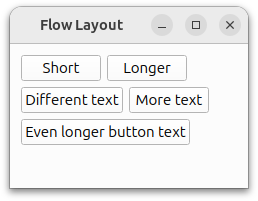
Flowlayout 类主要使用 `QLayout ` 和 `QWidgetItem` 方法,而 Window 则使用 `QWidget ` 和 `QLabel` 方法。
如需了解更多信息,请访问“布局管理”页面。
运行示例
您可以通过以下方式运行示例:
- Qt Creator
打开Welcome 模式,并从Examples 中选择该示例。有关更多信息,请参阅Qt Creator :教程:构建和运行。
- Qt Extension for Visual Studio Code
在Command Palette 中运行Qt: Open Qt examples 命令,并从列表中选择该示例。有关更多信息,请参阅Qt Extension for Visual Studio Code :教程:构建和运行。
FlowLayout 类定义
FlowLayout 类继承自QLayout 。这是一个自定义布局类,用于按水平和垂直方向排列其子控件。
class FlowLayout : public QLayout
{
public:
    explicit FlowLayout(QWidget *parent, int margin = -1, int hSpacing = -1, int vSpacing = -1);
    explicit FlowLayout(int margin = -1, int hSpacing = -1, int vSpacing = -1);
    ~FlowLayout();

    void addItem(QLayoutItem *item) override;
    int horizontalSpacing() const;
    int verticalSpacing() const;
    Qt::Orientations expandingDirections() const override;
    bool hasHeightForWidth() const override;
    int heightForWidth(int) const override;
    int count() const override;
    QLayoutItem *itemAt(int index) const override;
    QSize minimumSize() const override;
    void setGeometry(const QRect &rect) override;
    QSize sizeHint() const override;
    QLayoutItem *takeAt(int index) override;

private:
    int doLayout(const QRect &rect, bool testOnly) const;
    int smartSpacing(QStyle::PixelMetric pm) const;

    QList<QLayoutItem *> itemList;
    int m_hSpace;
    int m_vSpace;
};
我们重新实现了从 `QLayout` 继承的函数。这些函数用于向布局中添加项目,并处理其方向和几何属性。
我们还声明了两个私有方法:doLayout() 和smartSpacing() 。doLayout() 负责布局项目,而smartSpacing() 方法则计算项目之间的间距。
FlowLayout 类的实现
首先,我们来看一下构造函数:
FlowLayout::FlowLayout(QWidget *parent, int margin, int hSpacing, int vSpacing)
    : QLayout(parent), m_hSpace(hSpacing), m_vSpace(vSpacing)
{
    setContentsMargins(margin, margin, margin, margin);
}

FlowLayout::FlowLayout(int margin, int hSpacing, int vSpacing)
    : m_hSpace(hSpacing), m_vSpace(vSpacing)
{
    setContentsMargins(margin, margin, margin, margin);
}在构造函数中,我们调用setContentsMargins() 来设置左、上、右和下边距。默认情况下,QLayout 会使用当前样式提供的值(参见QStyle::PixelMetric )。
FlowLayout::~FlowLayout()
{
    QLayoutItem *item;
    while ((item = takeAt(0)))
        delete item;
}在此示例中,我们重写了addItem() ——这是一个纯虚函数。使用addItem() 时,布局项的所有权会转移给布局,因此删除这些布局项是布局的责任。
void FlowLayout::addItem(QLayoutItem *item)
{
    itemList.append(item);
}
addItem() 该函数用于向布局中添加项目。
int FlowLayout::horizontalSpacing() const
{
    if (m_hSpace >= 0) {
        return m_hSpace;
    } else {
        return smartSpacing(QStyle::PM_LayoutHorizontalSpacing);
    }
}

int FlowLayout::verticalSpacing() const
{
    if (m_vSpace >= 0) {
        return m_vSpace;
    } else {
        return smartSpacing(QStyle::PM_LayoutVerticalSpacing);
    }
}
我们实现了 `horizontalSpacing() ` 和 `verticalSpacing() ` 方法,用于获取布局内控件之间的间距。如果该值小于或等于 0,则直接使用该值;否则,将调用 `smartSpacing() ` 来计算间距。
int FlowLayout::count() const
{
    return itemList.size();
}

QLayoutItem *FlowLayout::itemAt(int index) const
{
    return itemList.value(index);
}

QLayoutItem *FlowLayout::takeAt(int index)
{
    if (index >= 0 && index < itemList.size())
        return itemList.takeAt(index);
    return nullptr;
}
随后,我们实现 `count() ` 方法来返回布局中的项目数量。为了遍历项目列表,我们使用 `itemAt() ` 和 `takeAt()` 方法从列表中移除和返回项目。如果移除了某个项目,剩余项目将重新编号。这三个函数都是 `QLayout` 类中的纯虚函数。
Qt::Orientations FlowLayout::expandingDirections() const
{
    return { };
}
expandingDirections() 返回Qt::Orientation,表示布局可利用的空间比其sizeHint() 更大。
bool FlowLayout::hasHeightForWidth() const
{
    return true;
}

int FlowLayout::heightForWidth(int width) const
{
    int height = doLayout(QRect(0, 0, width, 0), true);
    return height;
}为了适应高度取决于宽度的控件,我们实现了heightForWidth() 。函数hasHeightForWidth() 用于检测这种依赖关系,而heightForWidth() 将宽度传递给doLayout() ,后者进而将该宽度作为布局矩形(即项目布局的边界)的参数。该矩形不包含布局的margin()。
void FlowLayout::setGeometry(const QRect &rect)
{
    QLayout::setGeometry(rect);
    doLayout(rect, false);
}

QSize FlowLayout::sizeHint() const
{
    return minimumSize();
}

QSize FlowLayout::minimumSize() const
{
    QSize size;
    for (const QLayoutItem *item : std::as_const(itemList))
        size = size.expandedTo(item->minimumSize());

    const QMargins margins = contentsMargins();
    size += QSize(margins.left() + margins.right(), margins.top() + margins.bottom());
    return size;
}
setGeometry() 通常用于执行实际布局,即计算布局项的几何属性。在此示例中,它调用doLayout() 并传递布局矩形。
sizeHint() 返回布局的首选大小,而 `minimumSize() ` 返回布局的最小大小。
int FlowLayout::doLayout(const QRect &rect, bool testOnly) const
{
    int left, top, right, bottom;
    getContentsMargins(&left, &top, &right, &bottom);
    QRect effectiveRect = rect.adjusted(+left, +top, -right, -bottom);
    int x = effectiveRect.x();
    int y = effectiveRect.y();
    int lineHeight = 0;
doLayout() 当 `horizontalSpacing() ` 或 `verticalSpacing() ` 未返回默认值时,该方法将处理布局。它使用 `getContentsMargins() ` 来计算布局项可用的区域。
    for (QLayoutItem *item : std::as_const(itemList)) {
        const QWidget *wid = item->widget();
        int spaceX = horizontalSpacing();
        if (spaceX == -1)
            spaceX = wid->style()->layoutSpacing(
                QSizePolicy::PushButton, QSizePolicy::PushButton, Qt::Horizontal);
        int spaceY = verticalSpacing();
        if (spaceY == -1)
            spaceY = wid->style()->layoutSpacing(
                QSizePolicy::PushButton, QSizePolicy::PushButton, Qt::Vertical);
随后,它会根据当前样式为布局中的每个控件设置适当的间距。
        int nextX = x + item->sizeHint().width() + spaceX;
        if (nextX - spaceX > effectiveRect.right() && lineHeight > 0) {
            x = effectiveRect.x();
            y = y + lineHeight + spaceY;
            nextX = x + item->sizeHint().width() + spaceX;
            lineHeight = 0;
        }

        if (!testOnly)
            item->setGeometry(QRect(QPoint(x, y), item->sizeHint()));

        x = nextX;
        lineHeight = qMax(lineHeight, item->sizeHint().height());
    }
    return y + lineHeight - rect.y() + bottom;
}
随后,通过将各项的宽度与行高相加到初始 x 和 y 坐标上,来计算布局中每项的位置。这进而使我们能够判断下一项是否能容纳在当前行中,还是必须下移到下一行。我们还会根据小部件的高度来确定当前行的高度。
int FlowLayout::smartSpacing(QStyle::PixelMetric pm) const
{
    QObject *parent = this->parent();
    if (!parent) {
        return -1;
    } else if (parent->isWidgetType()) {
        QWidget *pw = static_cast<QWidget *>(parent);
        return pw->style()->pixelMetric(pm, nullptr, pw);
    } else {
        return static_cast<QLayout *>(parent)->spacing();
    }
}
smartSpacing() 该功能旨在获取顶级布局或子布局的默认间距。当父布局为QWidget 时,顶级布局的默认间距将通过查询样式来确定;当父布局为QLayout 时,子布局的默认间距将通过查询父布局的间距来确定。
© 2026 The Qt Company Ltd. Documentation contributions included herein are the copyrights of their respective owners. The documentation provided herein is licensed under the terms of the GNU Free Documentation License version 1.3 as published by the Free Software Foundation. Qt and respective logos are trademarks of The Qt Company Ltd. in Finland and/or other countries worldwide. All other trademarks are property of their respective owners.
