
vcpkgマニフェストファイルを作成する
新しいvcpkgパッケージマネージャーマニフェスト (vcpkg.json) ファイルを作成するには:
- 「File 」 > 「New File 」 > 「vcpkg 」 > 「vcpkg.json Manifest File 」 > 「Choose 」の順に選択し、「Location 」ダイアログを開きます。
- 「File name 」で、マニフェストファイルの名前を入力します。
- 「Path 」で、マニフェストファイルのパスを入力します。
- [Next ] を選択して、[vcpkg.json Manifest File ] ダイアログを開きます。
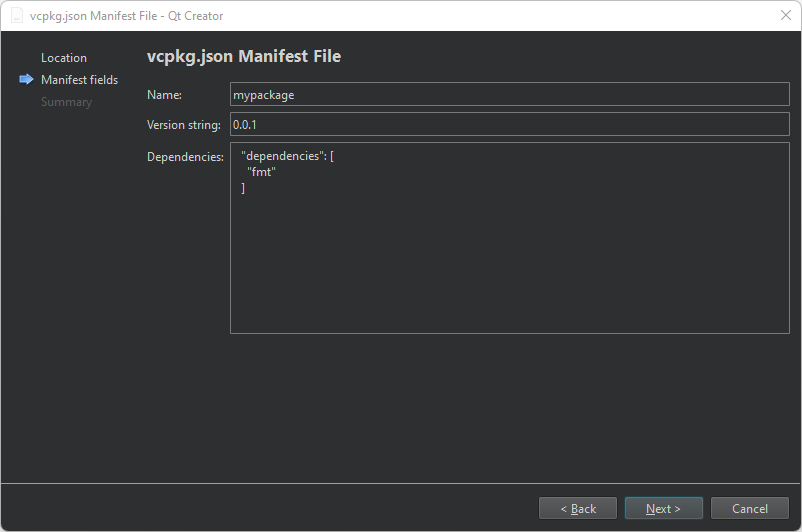
- [Name] で、マニフェストファイルの名前を入力します。[ ] で、ファイルのバージョン番号を入力します。
- [Version string] で、ファイルのバージョン番号を入力します。
- 「Dependencies 」で、管理するパッケージを入力します。
パッケージは、後でマニフェストエディタで追加することもできます。
- 「Next 」を選択して、「Project Management 」ページを開きます。
- 「Finish 」を選択して、ファイルを作成します。
ウィザードにより、vcpkg.json ファイルがプロジェクトのCMakeLists.txt ファイルに自動的に追加されます。
「vcpkg パッケージマネージャーの設定」および「vcpkg マニフェストファイルの編集」も参照してください 。
Copyright © The Qt Company Ltd. and other contributors. Documentation contributions included herein are the copyrights of their respective owners. The documentation provided herein is licensed under the terms of the GNU Free Documentation License version 1.3 as published by the Free Software Foundation. Qt and respective logos are trademarks of The Qt Company Ltd in Finland and/or other countries worldwide. All other trademarks are property of their respective owners.
