
vcpkg パッケージマネージャーの設定
実験的な vcpkg プラグインは、vcpkgC/C++ パッケージマネージャーを統合しています。これは、サポートされているすべての開発プラットフォームで利用可能です。
CMakeをビルドシステムとして使用する場合、vcpkg.json ファイルを作成・編集して、プロジェクトの一部としてビルドするパッケージを指定します。
注: vcpkg プラグインを使用するには、有効にする必要があります 。
vcpkg のセットアップ
コマンドラインから vcpkg を設定するには、次のように入力します:
$ git clone https://github.com/microsoft/vcpkg
$ cd vcpkg

$ ./bootstrap-vcpkg.sh
vcpkgへのパスを設定する
Path をvcpkgのインストール先ディレクトリに設定するには、Preferences >CMake >Vcpkg を選択します。
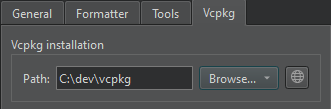
まだ vcpkg をインストールしていない場合は、「 」を選択して vcpkg をダウンロードしてください。
自動セットアップを無効にする
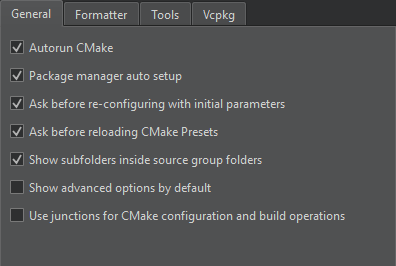
デフォルトでは、vcpkg は CMake を使用するように自動的にセットアップされます。自動セットアップを無効にするには、[Preferences ] > [CMake ] > [General ] > [Package manager auto setup] の順に選択します。
「vcpkg マニフェストファイルの作成」、「vcpkg マニフェストファイルの編集」、「プラグインの有効化と無効化」、「サポートされているプラットフォーム」、および「vcpkg」も参照してください 。
Copyright © The Qt Company Ltd. and other contributors. Documentation contributions included herein are the copyrights of their respective owners. The documentation provided herein is licensed under the terms of the GNU Free Documentation License version 1.3 as published by the Free Software Foundation. Qt and respective logos are trademarks of The Qt Company Ltd in Finland and/or other countries worldwide. All other trademarks are property of their respective owners.
