
計算を行う
ロケーターで基本的な計算を行うには:
- Ctrl+K(macOSではCmd+K)を押してロケーターを起動します。
=と入力し、その後にスペースを入力します。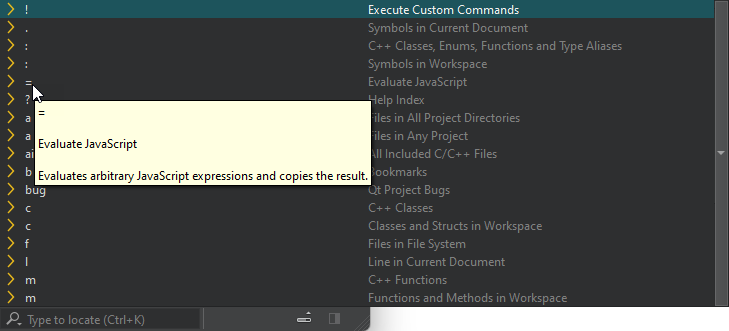
- 計算を行います。
入力項目を移動し、「Enter」キーを押して結果をクリップボードにコピーします
組み込み関数
((1 + 2) * 3) のような単純な算術演算の他に、以下の組み込み関数が用意されています:
| 関数 | 目的 |
|---|---|
| abs(x) | xの絶対値を返します |
| acos(x) | x のアークコサインをラジアン単位で返します |
| asin(x) | x のアークサインをラジアン単位で返します |
| atan(x) | x のアークタンジェントをラジアン単位で返します |
| atan2(x, y) | 引数の商の逆正切を返します |
| bin(x) | x の 2 進表記を返します |
| ceil(x) | x を次の整数に切り上げた値を返す |
| cos(x) | x のコサインを返します(x はラジアン単位です) |
| exp(x) | E の x 乗の値を返します |
| e() | オイラーの定数 E(2.71828...)を返します |
| floor(x) | x の値を、次の整数に切り下げて返します |
| hex(x) | x の 16 進数表記を返します |
| log(x) | x の自然対数(底 E)を返します |
| max([value1[, value2[, ...]]]) | 指定された数値のうち最大の値を返します |
| min([value1[, value2[, ...]]]) | 指定された数値のうち、最小値を返します |
| oct(x) | x の 8 進数表現を返します |
| pi() | PI (3.14159...) を返します |
| pow(x, y) | x の y 乗の値を返します |
| random() | 0 から 1 までの間の乱数を返します |
| round(x) | x を次の整数に丸めた値を返します |
| sin(x) | xの正弦値を返します(xはラジアン単位です) |
| sqrt(x) | xの平方根を返します |
| tan(x) | x の正接を返します(x はラジアン単位です) |
「ロケーターによるナビゲーション」および「ロケーターの設定」も参照してください 。
Copyright © The Qt Company Ltd. and other contributors. Documentation contributions included herein are the copyrights of their respective owners. The documentation provided herein is licensed under the terms of the GNU Free Documentation License version 1.3 as published by the Free Software Foundation. Qt and respective logos are trademarks of The Qt Company Ltd in Finland and/or other countries worldwide. All other trademarks are property of their respective owners.
