
Silver Searcherを有効にする
お使いのコンピュータにSilver Searcherをインストールすれば、Qt Creator の検索エンジンとしてSilver Searcherを利用できます。
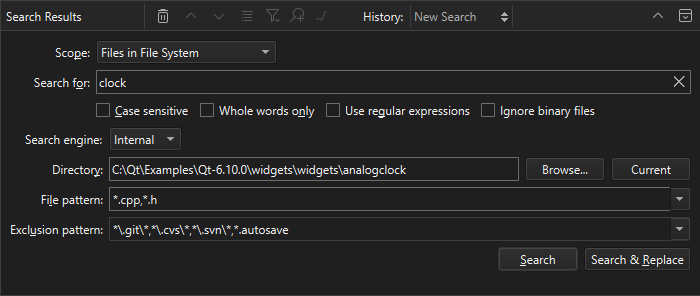
注: Silver Searcher を使用するには、Silver Searcher プラグインを有効にしてください 。
Silver Searcher を使用するには:
- The Silver SearcherまたはGitHub から Silver Searcher をダウンロードしてインストールします。
一部のプラットフォームでは、ソースコードからSilver Searcherをビルドする必要がある場合があります。
- 検索を行う際は、Search engine で「Silver Searcher 」を選択してください。
Qt Creator がSilver Searcherを見つけられない場合は、PATH 環境変数に設定されていない場所にインストールしている可能性があります。
Silver Searcherのインストール場所を設定する
Qt Creator にSilver Searcherの場所を指定するには:
- Preferences >Environment >System に移動します。
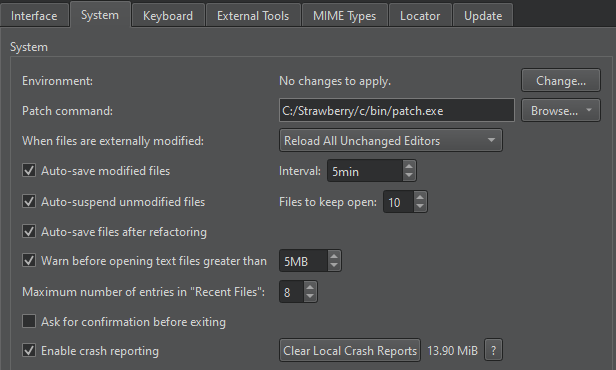
- Environment で、「Change 」を選択します。
- 「Edit Environment 」で、Silver Searcherの実行ファイルへのパスを追加します:
PATH=</path/to/bin>:${PATH}
![[環境] ダイアログの編集](images/qtcreator-edit-environment.webp "[環境] ダイアログの編集")
「プラグインの有効化と無効化」、「検索方法」、および「環境設定の編集 」も参照してください 。
Copyright © The Qt Company Ltd. and other contributors. Documentation contributions included herein are the copyrights of their respective owners. The documentation provided herein is licensed under the terms of the GNU Free Documentation License version 1.3 as published by the Free Software Foundation. Qt and respective logos are trademarks of The Qt Company Ltd in Finland and/or other countries worldwide. All other trademarks are property of their respective owners.
