
インクルード階層を表示
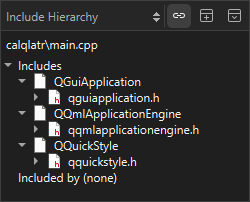
「Include Hierarchy 」ビューを使用すると、現在のファイルがインクルードしているファイルや、現在のファイルをインクルードしているファイルを確認できます。
ファイルのインクルード階層を表示するには:
- エディタ内でファイルを右クリックします。
- 「Open Include Hierarchy 」を選択するか、Ctrl+Shift+I キーを押します。
このビューをエディタで現在開いているファイルと同期させるには、「 」(Synchronize with Editor )を選択します。
Copyright © The Qt Company Ltd. and other contributors. Documentation contributions included herein are the copyrights of their respective owners. The documentation provided herein is licensed under the terms of the GNU Free Documentation License version 1.3 as published by the Free Software Foundation. Qt and respective logos are trademarks of The Qt Company Ltd in Finland and/or other countries worldwide. All other trademarks are property of their respective owners.
