
デザインの注釈付け
デザインをQMLファイルとして、レビューやさらなる開発のために提出できます。デザインに注釈を付けることで、レビュー担当者や開発者にそのデザインに関する追加情報を提供できます。ファイル全体に適用されるグローバルな注釈を追加したり、個々のコンポーネントに注釈を付けたりすることができます。
注釈は、注釈名と1つまたは複数のコメントで構成されます。コメントには、タイトル、作成者、およびコメント本文が含まれます。
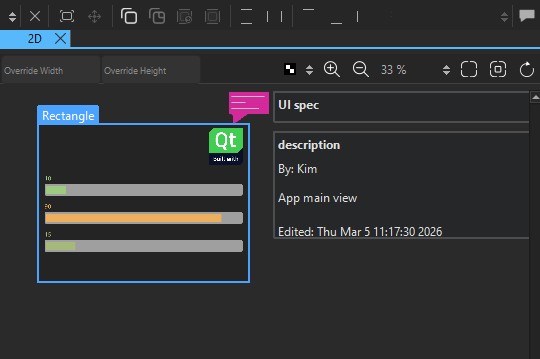
注釈は、ファイルを保存する際にQMLファイルの末尾に保存されます。これらはQMLのパフォーマンスに一切影響を与えません。
コンポーネントへの注釈の追加
コンポーネントに注釈を追加するには:
- 「Navigator 」または「2D 」ビューで、注釈を追加するコンポーネントを選択します。
- 「Properties 」で「Add Annotation 」を選択し、「Annotation Editor 」を開きます。
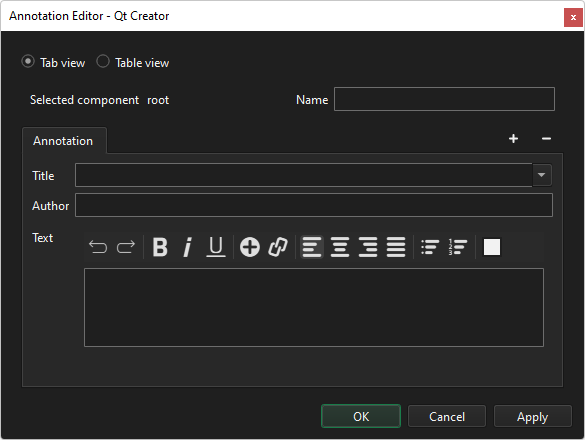
Selected component コンポーネントの ID が表示されます。
- Name で、コンポーネントを説明する自由形式のテキストを入力します。
- Title で、このコメントのタブに表示するテキストを入力します。
- Author で、作成者の名前を入力します。
- [Text] で、コメントの本文を入力します。
- 「OK 」を選択します。
コンポーネントに関するコメントをさらに追加するには、[ ] (Add Comment) を選択します。
アクティブなコメントを削除するには、[ ] (Remove Comment) を選択します。注釈を削除するには、注釈アイコンを右クリックし、[Remove Annotation] を選択します。
注釈をテーブル形式で表示するには、Table view を選択します。
注釈を編集するには、コンポーネントのコンテキストメニューから「Edit Annotation 」を選択します。
グローバル注釈を追加する
グローバル注釈を追加または編集するには:
- 上部のツールバーで「
 」を選択します。
 - 「Edit 」に移動し、「Edit Global Annotations 」を選択します。
グローバル注釈には、設計作業が進行中か、レビューに提出済みか、あるいは完了とみなせるかを示すための追加のステータスプロパティがあります。
ステータスを設定するには、[Add Status] を選択します。
「Qt Quick UI の設計方法」、「 Qt Quick UI の設計」、「 Qt Quick UI の設計」も参照してください 。
Copyright © The Qt Company Ltd. and other contributors. Documentation contributions included herein are the copyrights of their respective owners. The documentation provided herein is licensed under the terms of the GNU Free Documentation License version 1.3 as published by the Free Software Foundation. Qt and respective logos are trademarks of The Qt Company Ltd in Finland and/or other countries worldwide. All other trademarks are property of their respective owners.
