
메손 빌드 구성
선택한 키트의 빌드 설정을 지정하려면 ‘ Projects ’ > ‘ Build Settings ’로 이동하십시오.
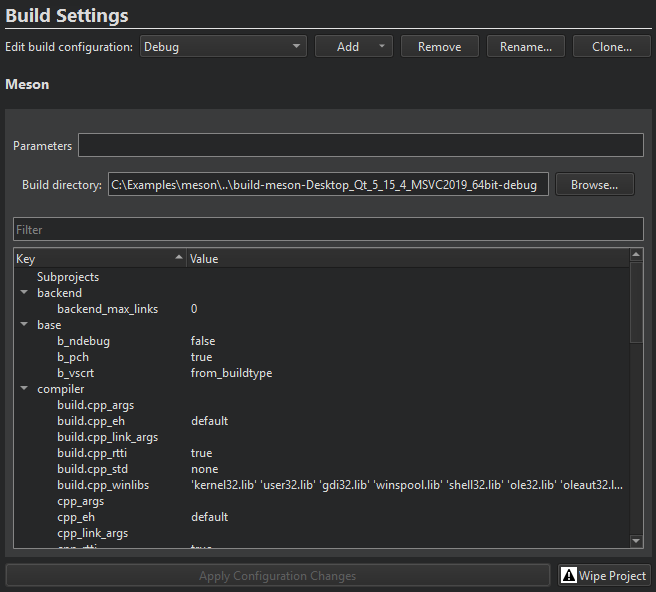
Meson은 ‘ Build directory ’ 필드에 지정된 디렉터리의 프로젝트를 빌드합니다.
빌드 설정은 범주별로 그룹화되어 있습니다. Qt Creator 과의 호환성을 보장하기 위해 backend, buildtype, debug 및 optimization 로 고정된 항목을 제외한 모든 설정을 수정할 수 있습니다.
설정을 수정하려면 해당 항목을 두 번 클릭하십시오. 수정된 설정은 ‘ Apply configuration changes ’를 선택하여 적용할 때까지 굵은 글씨로 표시됩니다. 이렇게 하면 ‘ meson configure ’가 실행됩니다. 문제가 발생하면 ‘ Wipe Project ’를 선택하여 빌드 디렉터리 구성을 수정하십시오.
Meson은 네이티브 빌드 외에도 크로스 컴파일을 지원합니다. ‘ Qt Creator ’을 선택하면 네이티브 빌드 파일이 자동으로 생성됩니다. 대신 사용자 정의 네이티브 파일이나 크로스 파일을 사용하려면 ‘ Parameters ’에서 파일 이름을 지정하십시오. 예를 들어, ‘ --cross-file cross_file.txt ’과 같이 지정합니다.
Meson 빌드 단계
Qt Creator meson compile --verbose target 를 실행하여 Meson 프로젝트를 빌드합니다.
Build Steps 에서 빌드 명령에 대한 인수와 대상을 추가할 수 있습니다.
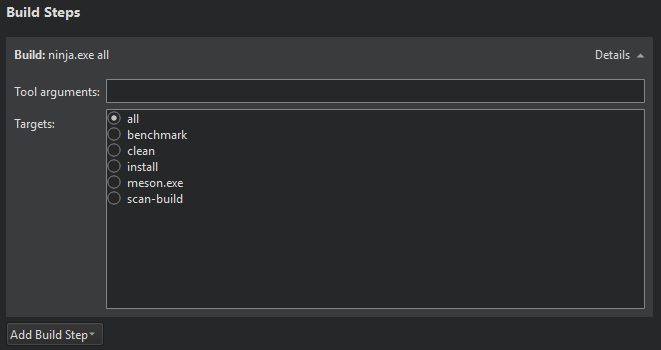
빌드 오류 및 경고는 분석되어 이슈(Issues)에 표시됩니다.
Meson 정리 단계
Meson으로 빌드할 때, Clean Steps 에서 clean 명령에 대한 인수와 대상을 추가할 수 있습니다.
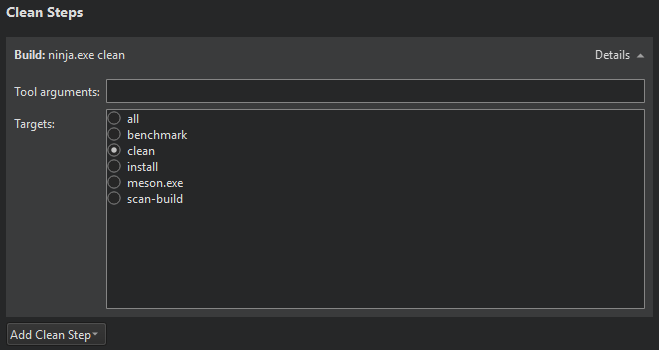
빌드 오류 및 경고는 분석되어 Issues 에 표시됩니다.
‘프로젝트에 키트 활성화하기’, ‘빌드용 프로젝트 구성하기’, ‘실행용 프로젝트 구성하기’, ‘프로젝트 열기’, ‘프로젝트 빌드 및 실행하기’ 및 ‘Meson’도참조하십시오 .
Copyright © The Qt Company Ltd. and other contributors. Documentation contributions included herein are the copyrights of their respective owners. The documentation provided herein is licensed under the terms of the GNU Free Documentation License version 1.3 as published by the Free Software Foundation. Qt and respective logos are trademarks of The Qt Company Ltd in Finland and/or other countries worldwide. All other trademarks are property of their respective owners.
