
코드 스타일 지정
파일의 MIME 유형에 따라 파일이 어떤 모드와 편집기에서 열리는지가 결정됩니다. Qt Creator 는 C++ 파일을 C++ 코드 편집기의 ' Edit ' 모드로 열고, QML 파일은 Qt Quick 편집기에서 엽니다.
다음에 대한 들여쓰기 지정:
- C++ 파일
- QML 파일
- Nim 파일
코드 스타일을 전체적으로 또는 프로젝트별로 개별적으로 지정할 수 있습니다. 여러 세트의 코드 스타일 설정을 지정하고 이를 쉽게 전환할 수 있습니다. 또한, 코드 스타일 설정을 가져오고 내보낼 수 있습니다.
현재 프로젝트에 대해 전역 코드 스타일을 재정의하려면:
- Projects > Project Settings > Code Style 로 이동합니다.
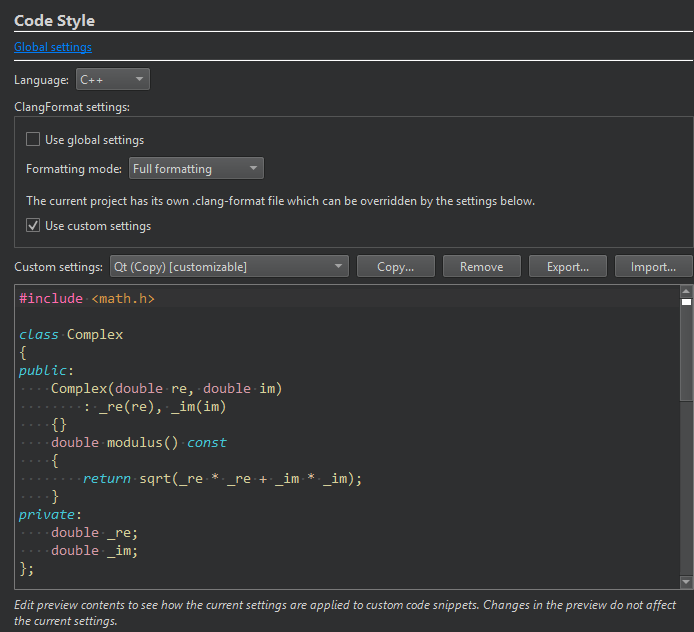
- Language 에서 C++ 를 선택하거나, Qt QuickNim 을 선택합니다.
- C++의 경우, 프로젝트에
.clang-format파일을 사용하려면 Use global settings 의 선택을 해제하십시오. - 프로젝트의 `
.clang-format` 파일을 재정의하려면 ` Use custom settings`을 선택하십시오. - Custom settings 에서 프로젝트에 사용할 설정을 선택하십시오.
드물게 ClangFormat이 특정 코드 구조에서 오류를 일으켜 Qt Creator 이 중단될 수 있습니다. 프로젝트에서 이러한 현상이 발생하면, Formatting mode 에서 Use Built-In Indenter 을 선택하여 해당 프로젝트에 대한 ClangFormat을 비활성화하십시오. 오류를 재현할 수 있다면, Help > Report Bug 로 이동하여 버그를 보고하고, 오류를 유발하는 코드를 버그 보고서에 첨부하십시오.
‘텍스트 또는 코드 들여쓰기’, ‘MIME 유형 편집’, ‘C++ 코드 스타일’, ‘ Qt Quick 코드 스타일 지정’ 및 ‘Nim’항목도 참조하십시오 .
Copyright © The Qt Company Ltd. and other contributors. Documentation contributions included herein are the copyrights of their respective owners. The documentation provided herein is licensed under the terms of the GNU Free Documentation License version 1.3 as published by the Free Software Foundation. Qt and respective logos are trademarks of The Qt Company Ltd in Finland and/or other countries worldwide. All other trademarks are property of their respective owners.
