
Nim
Nim 코드 스타일 및 도구 경로를 설정합니다.
코드 스타일
Nim 편집기 환경 설정 지정(실험적 기능):
- Preferences > Nim 로 이동합니다.
- Custom settings 에서 수정할 설정을 선택한 다음, Copy 를 선택합니다.
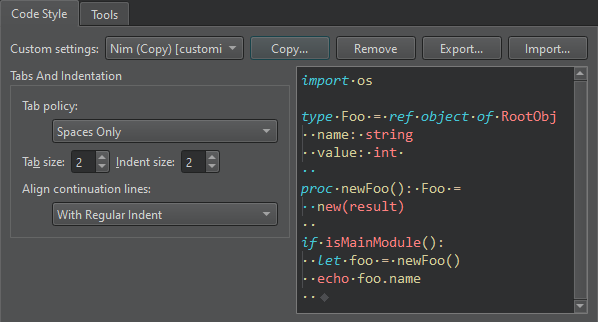
- 설정 이름을 지정하고 ‘ OK ’를 선택합니다.
- Tab 키 누름을 해석하는 방법과 연속 줄을 정렬하는 방법을 지정합니다.
- Apply 을 선택하여 설정을 저장합니다.
특정 프로젝트에 대해 다른 설정을 지정하려면, ‘ Projects ’ > ‘ Code Style ’를 선택하십시오.
도구
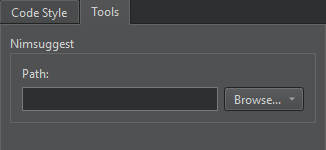
Nimsuggest 도구를 사용하여 .nim 소스 파일을 쿼리하고 코드 완성 제안을 얻을 수 있습니다.
Nimsuggest를 사용하려면 개발용 PC에 Nimsuggest를 설치하고 Path 에서 도구 실행 파일의 경로를 입력해야 합니다.
참조: 자동 완성 메뉴에 코드 스니펫 추가, 코드 완성, 환경 설정 찾기, 텍스트 또는 코드 들여쓰기, 코드 스타일 지정, 완성, Nimble 및 스니펫.
Copyright © The Qt Company Ltd. and other contributors. Documentation contributions included herein are the copyrights of their respective owners. The documentation provided herein is licensed under the terms of the GNU Free Documentation License version 1.3 as published by the Free Software Foundation. Qt and respective logos are trademarks of The Qt Company Ltd in Finland and/or other countries worldwide. All other trademarks are property of their respective owners.
