
패키지 다이어그램 만들기
패키지 다이어그램을 포함하는 UML 스타일의 모델을 생성합니다. 이 모델은 패키지와 그 관계를 표시하여 시스템이 어떻게 패키징되어 있는지 시각화합니다.
패키지 다이어그램에 중첩된 패키지 요소를 추가할 수 있습니다. 다이어그램 내 요소의 깊이는 구조화된 모델의 깊이와 일치합니다. 동일한 유형의 다른 요소 위에 중첩된 요소는 선택한 색상보다 더 어두운 색조로 자동으로 그려집니다.
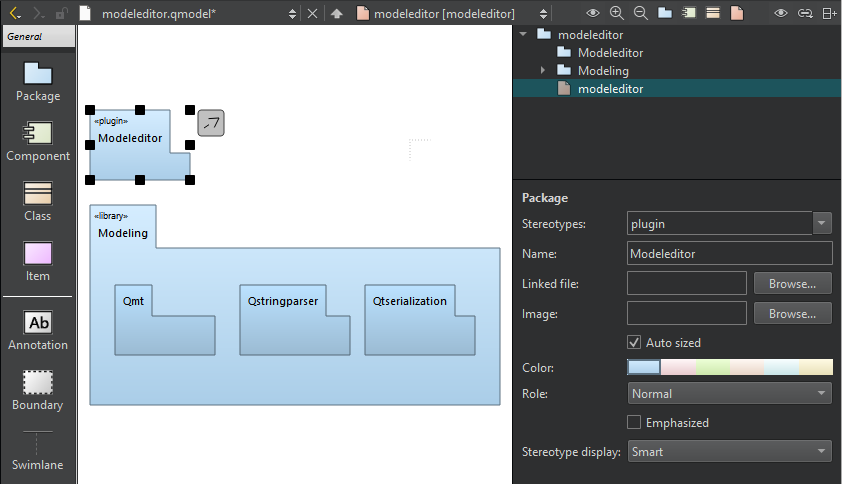
모델 편집기의 패키지 다이어그램.
패키지를 마우스 오른쪽 버튼으로 클릭하여 컨텍스트 메뉴를 열고, ‘ Create Diagram ’을 선택하여 모델 내에 새로운 패키지 다이어그램을 생성합니다. 요소 트리에서 항목을 다이어그램으로 드래그합니다.
패키지의 포함 종속성을 업데이트하려면 ‘ Update Include Dependencies ’를 선택하십시오.
'방법: UML 스타일 모델 편집' 및 'UML 스타일 모델 편집'도 참조하십시오 .
Copyright © The Qt Company Ltd. and other contributors. Documentation contributions included herein are the copyrights of their respective owners. The documentation provided herein is licensed under the terms of the GNU Free Documentation License version 1.3 as published by the Free Software Foundation. Qt and respective logos are trademarks of The Qt Company Ltd in Finland and/or other countries worldwide. All other trademarks are property of their respective owners.
