
빌드 출력 분석
Qt Creator 의 출력 파서를 사용하여 Qt Creator 외부에서 수행된 빌드의 출력이나 이전 빌드 실행에서 저장된 출력을 파싱할 수 있습니다. 기본적으로 활성 프로젝트에 선택된 키트의 파서가 사용되지만, 다른 키트를 선택할 수도 있습니다.
빌드 출력을 구문 분석하려면:
- Tools > Parse Build Output 로 이동하거나, ‘ Issues ’ 뷰에서 ‘
 ’ (Create Issues From External Build Output)를 선택합니다.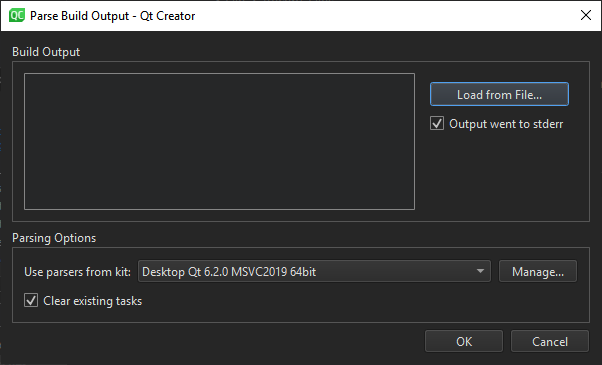
- Build Output 에 빌드 출력을 붙여넣거나, Load from File 를 선택하여 파일에서 불러옵니다.
- 파서가
stdout에 있는 이슈를 처리하도록 설정된 경우, Output went to stderr 의 내용을 지우십시오. - Use parsers from kit 에서 출력 파싱에 사용할 키트를 선택하십시오. 키트 설정을 확인하고 수정하려면 Manage 를 선택하십시오.
- 파서는 ‘ Issues ’에 파싱된 출력을 표시합니다. 기본적으로 새 출력을 추가하기 전에 보기가 지워집니다. ‘ Clear existing tasks ’를 선택하면 새 출력을 기존 출력 뒤에 추가할 수 있습니다.
- OK 를 선택하여 구문 분석을 시작합니다.
‘이슈’항목도 참조하십시오 .
Copyright © The Qt Company Ltd. and other contributors. Documentation contributions included herein are the copyrights of their respective owners. The documentation provided herein is licensed under the terms of the GNU Free Documentation License version 1.3 as published by the Free Software Foundation. Qt and respective logos are trademarks of The Qt Company Ltd in Finland and/or other countries worldwide. All other trademarks are property of their respective owners.
