
디버깅 활성화
키트에 대해 선택한 ‘Run device’에서 애플리케이션을 실행하기 위한 설정을 지정하려면, ‘ Projects ’ > ‘ Run Settings ’로 이동하십시오.
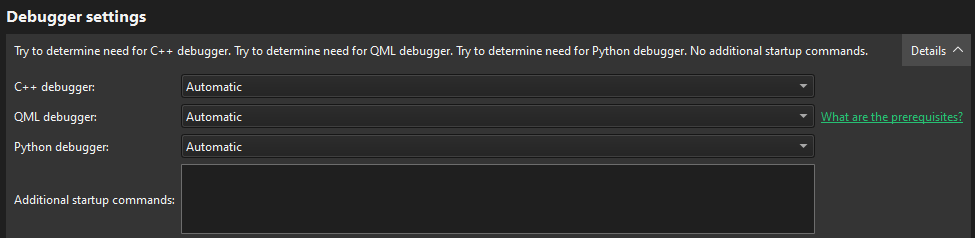
디버깅할 언어를 선택하려면 Debugger Settings > C++ debugger, QML debugger 또는 Python debugger 에서 Automatic 또는 Enabled 를 선택하십시오.
C++ 디버깅
Additional startup commands 에서는 C++ 디버깅을 위한 추가 설정을 지정할 수 있습니다:
- 사용자 지정 디버깅 헬퍼
- GDB가 시작된 후, 디버깅 대상 프로그램이 시작되거나 연결되기 전, 그리고 디버깅 헬퍼가 초기화되기 전에 실행할GDB 명령어
그러나 일반적으로 이 필드는 비워 두어도 됩니다.
디버그 Qt Quick
잘 알려진 포트에서 소켓을 열면 보안 위험이 발생할 수 있습니다. 인터넷상의 누구든지 디버깅 중인 애플리케이션에 연결하여 임의의 JavaScript 함수를 실행할 수 있습니다. 따라서 해당 포트가 방화벽에 의해 적절히 보호되고 있는지 확인하십시오.
Qt Quick 애플리케이션 프로젝트의 디버깅을 지원하는 빌드 구성을 만들려면, 전역적으로 또는 프로젝트의 ` Build Settings `에서 QML 디버깅을 활성화해야 합니다.
‘프로젝트 빌드 및 실행’, ‘방법: 디버깅’, ‘디버깅’ 및 ‘디버거’항목도 참조하십시오 .
Copyright © The Qt Company Ltd. and other contributors. Documentation contributions included herein are the copyrights of their respective owners. The documentation provided herein is licensed under the terms of the GNU Free Documentation License version 1.3 as published by the Free Software Foundation. Qt and respective logos are trademarks of The Qt Company Ltd in Finland and/or other countries worldwide. All other trademarks are property of their respective owners.
