
정규 표현식을 사용하여 검색 및 바꾸기
Search Results 보기에서 정규식을 사용하여 여러 파일에서 검색 및 바꾸기.
Qt Creator 에서 사용되는 정규 표현식은 Perl 정규 표현식을 기반으로 합니다. 정규 표현식 사용에 대한 자세한 내용은 QRegularExpression 를 참조하십시오.
예를 들어, 등호 검사(foo == bar)를 함수(foo.equals(bar))로 대체하려면:
- 바꾸기 작업은 되돌릴 수 없으므로 변경 내용을 버전 관리 시스템에 커밋하십시오.
- Ctrl+Shift+F를 누르거나 Edit > Find/Replace > Advanced Find > Open Advanced Find 경로를 따라 Search Results 를 엽니다.
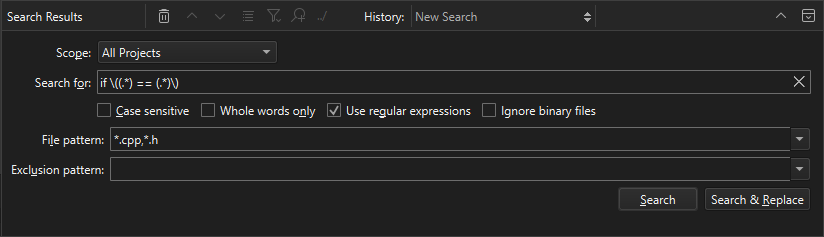
- Scope 에서 검색에 적합한 항목을 선택하십시오.
- Use regular expressions 를 선택하십시오.
- Search for 에 다음 텍스트를 입력하십시오:
if \((.*) == (.*)\)
- ' Search & Replace '을 선택하여 검색 결과 목록을 확인하십시오.
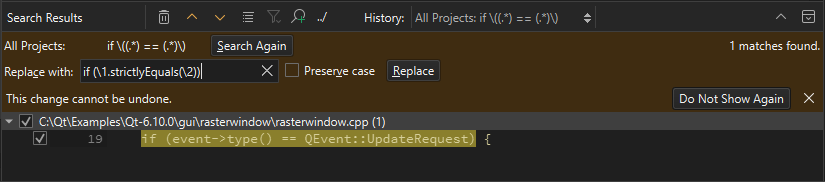
- ' Replace with'에서 다음 텍스트를 입력하십시오:
if (\1.strictlyEquals(\2))
- ' Replace '를 선택하여 해당 텍스트가 포함된 모든 부분을 모두 교체하십시오.
‘방법: 코드 편집’, ‘방법: 검색’ 및 ‘코드 편집’항목도 참조하십시오 .
Copyright © The Qt Company Ltd. and other contributors. Documentation contributions included herein are the copyrights of their respective owners. The documentation provided herein is licensed under the terms of the GNU Free Documentation License version 1.3 as published by the Free Software Foundation. Qt and respective logos are trademarks of The Qt Company Ltd in Finland and/or other countries worldwide. All other trademarks are property of their respective owners.
