
완성
코드 자동 완성 설정을 지정하려면 ‘ Preferences ’ > ‘ Text Editor ’ > ‘ Completion ’을 선택하십시오.
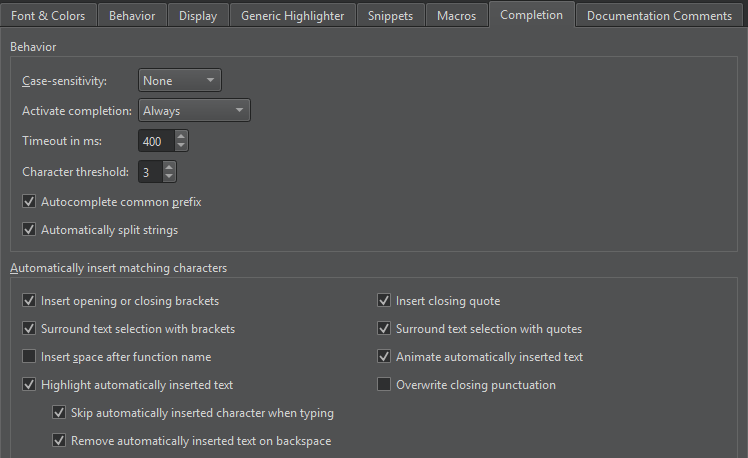
코드 자동 완성 동작
기본적으로 코드 자동 완성 기능은 대소문자를 구분하지 않습니다. 전체 대소문자 구분 또는 첫 글자 대소문자 구분을 적용하려면 ‘ Case-sensitivity ’ 필드에서 ‘ Full ’ 또는 ‘ First Letter ’을 선택하십시오.
기본적으로 코드 완성 기능은 항상 호출되지만, ‘ Activate completion ’ 필드에서 이 동작을 변경하여 ‘ Manually ’ 또는 ‘ When Triggered ’로 호출되도록 설정할 수 있습니다.
' Timeout in ms ' 필드에서 코드 완성의 타임아웃을 밀리초 단위로 설정할 수 있습니다.
' Character threshold ' 필드에서 코드 완성 기능이 작동하기 전에 입력해야 하는 문자 수를 지정하십시오.
완성을 수동으로 호출하면, ‘ Qt Creator ’ 기능이 제안 목록의 공통 접두사를 완성해 줍니다. 이는 이름이 비슷한 멤버가 여러 개 있는 클래스의 경우 특히 유용합니다. 이 기능을 비활성화하려면 ‘ Autocomplete common prefix ’의 선택을 해제하십시오.
Automatically split strings 을 선택하면 Enter 키를 누를 때 커서 위치에 닫는 따옴표를 추가하고, 다음 줄의 시작 부분(나머지 문자열 앞)에 여는 따옴표를 추가하여 문자열을 두 줄로 나눕니다. 또한 Shift+Enter를 누르면 커서 위치에 이스케이프 문자를 삽입하고 나머지 문자열을 다음 줄로 이동시킵니다.
일치하는 문자를 자동으로 삽입하기
코드를 선택한 상태에서 괄호나 따옴표를 입력하면, 선택한 부분의 끝에 일치하는 닫는 문자가 자동으로 추가됩니다.
기본적으로 자동으로 삽입된 텍스트는 강조 표시되고 애니메이션 효과가 적용되며, 입력 시 건너뛰고 Backspace를 누르면 제거됩니다.
참조: 사용 방법: 편집기 구성, CMake 코드 자동 완성, 코드 자동 완성, 코드를 괄호나 따옴표로 묶기, Nim.
Copyright © The Qt Company Ltd. and other contributors. Documentation contributions included herein are the copyrights of their respective owners. The documentation provided herein is licensed under the terms of the GNU Free Documentation License version 1.3 as published by the Free Software Foundation. Qt and respective logos are trademarks of The Qt Company Ltd in Finland and/or other countries worldwide. All other trademarks are property of their respective owners.
