
컴파일 결과 보기
Compile Output ‘이슈’에 표시된 정보를 보다 상세하게 보여줍니다.
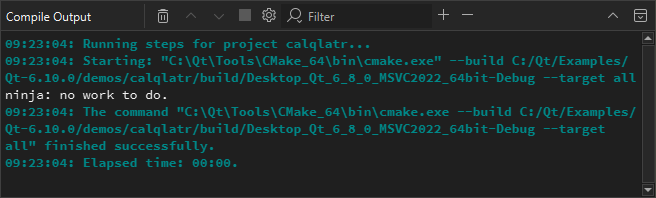
오류 메시지에 있는 파일 이름을 더블 클릭하면 코드 편집기에서 해당 파일이 열립니다.
빌드를 취소하려면 ‘ Cancel Build ’ 버튼을 선택하세요.
출력 결과를 클립보드에 복사하려면 컨텍스트 메뉴에서 ‘ Select All ’을 선택한 다음, ‘ Copy ’을 선택하십시오. 나중에 프로젝트를 다시 빌드하지 않고도 출력 결과를 확인하고 싶다면 파일을 저장하십시오. 이는 빌드하는 데 오랜 시간이 걸리는 대규모 프로젝트에서 유용합니다.
컴파일 출력 기본 설정
애플리케이션을 빌드할 때 출력 시 ‘ Compile Output ’ 보기를 열지 여부를 지정하려면:
- 환경 설정을 엽니다:
- ' Compile Output ' 뷰에서 '
 '를 선택합니다(Configure).
 - ‘ Preferences ’ > ‘ Build & Run ’ > ‘ Compile Output ’을 선택합니다.
- ' Compile Output ' 뷰에서 '
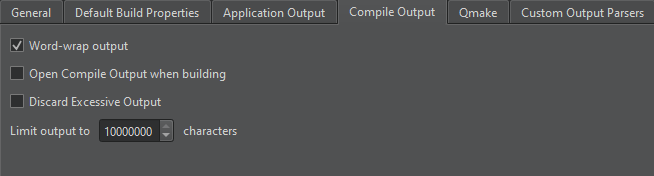
- Open Compile Output when building 를 선택하십시오.
- Discard excessive output 를 선택하여 처리 속도보다 빠르게 지속적으로 들어오는 컴파일 출력을 버리십시오.
- ' Limit output to'에서 표시할 빌드 출력 줄의 최대 수를 지정합니다.
‘출력 보기’, ‘사용자 지정 출력 파서 추가’, ‘빌드 출력 구문 분석’ 및 ‘키트 관리’항목도 참조하십시오 .
Copyright © The Qt Company Ltd. and other contributors. Documentation contributions included herein are the copyrights of their respective owners. The documentation provided herein is licensed under the terms of the GNU Free Documentation License version 1.3 as published by the Free Software Foundation. Qt and respective logos are trademarks of The Qt Company Ltd in Finland and/or other countries worldwide. All other trademarks are property of their respective owners.
