
指定依赖项
如果一个会话中加载了多个项目,您可以定义它们的构建顺序。例如,如果项目 A 依赖于项目 B,则必须先构建项目 B。
注意: 构建顺序作为会话的属性进行存储,而非项目属性。必须打开该会话,这些设置才会生效。
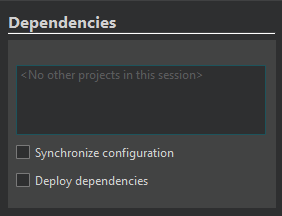
要定义会话中项目的构建顺序:
- 转至“Projects ” > “Project Settings ” > “Dependencies ”。
- 选择在构建当前项目之前必须先构建的项目。
- 选择“Synchronize configuration ”以使用相同的开发套件以及相同的构建和部署配置,来构建并部署会话中加载的所有依赖项目。
- 选择“Deploy dependencies ”以部署已构建的依赖项目。
Qt Creator 根据您为会话中加载的项目指定的依赖关系计算构建顺序。
注意:您 无法使用此视图为项目指定子项目。
另请参阅 “将子项目添加到项目”和“管理会话”。
Copyright © The Qt Company Ltd. and other contributors. Documentation contributions included herein are the copyrights of their respective owners. The documentation provided herein is licensed under the terms of the GNU Free Documentation License version 1.3 as published by the Free Software Foundation. Qt and respective logos are trademarks of The Qt Company Ltd in Finland and/or other countries worldwide. All other trademarks are property of their respective owners.
