
指定编辑器设置
Qt Creator 根据文件的 MIME 类型来确定打开该文件时应使用哪种模式和编辑器。例如,Qt Creator 会在文本编辑器中以Edit 模式打开.txt 文件。
要配置当前项目的文本编辑器行为:
- 选择“Projects ” > “Project Settings ” > “Editor ”。
- 取消选中“Use global settings ”。
- 为该项目指定文本编辑器设置。
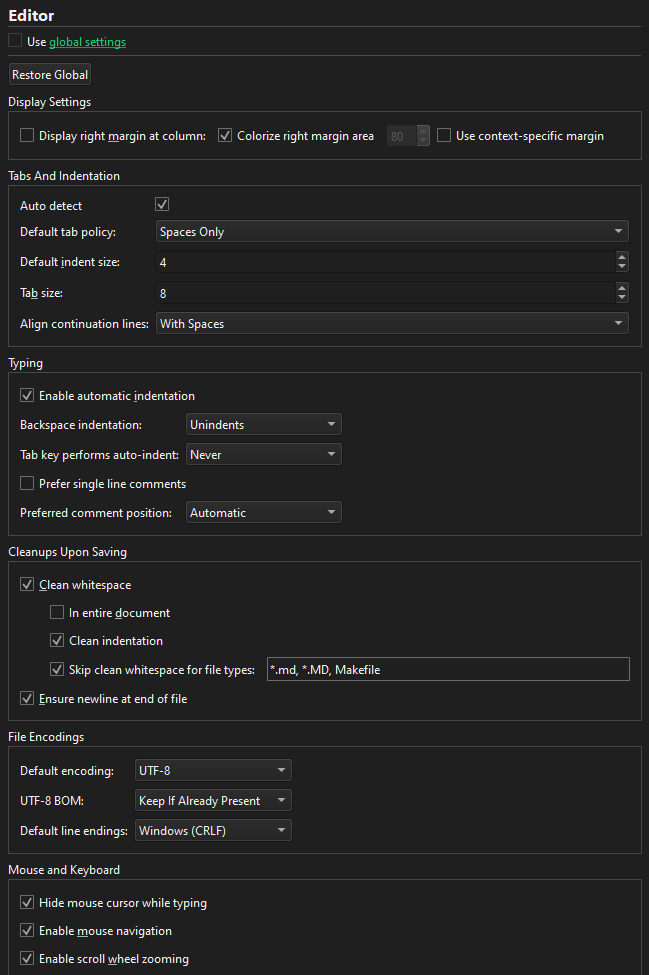
选择“Restore Global ”以恢复为全局设置。
Copyright © The Qt Company Ltd. and other contributors. Documentation contributions included herein are the copyrights of their respective owners. The documentation provided herein is licensed under the terms of the GNU Free Documentation License version 1.3 as published by the Free Software Foundation. Qt and respective logos are trademarks of The Qt Company Ltd in Finland and/or other countries worldwide. All other trademarks are property of their respective owners.
