
添加自定义编译器
若要添加未在Preferences >Kits >Compilers 列表中列出的编译器,或要添加远程编译器,请使用Custom 选项。指定编译器和 make 工具所在目录的路径,并设置编译器的首选项。
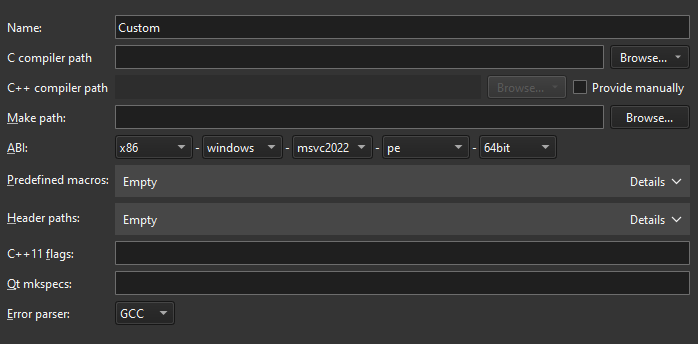
要添加其他编译器:
- 选择“Preferences ” > “Kits ” > “Compilers ” > “Add ” > “Custom ”。
- 在“Name ”中,输入编译器的名称。
- 在“C compiler path ”中,输入 C 编译器所在目录的路径。
在“Browse ”(macOS 系统中为“Choose ”)的下拉菜单中选择“Remote ”,以添加远程 Linux 设备或 Docker 环境中编译器的路径。
- 在“C++ compiler path ”中,选择“Provide manually ”以输入 C++ 编译器所在目录的路径。
选择“Remote ”以添加远程 Linux 设备或 Docker 环境中的编译器路径。
- 在“Make path ”中,输入 make 工具所在目录的路径。
- 在“ABI ”中,指定 ABI 版本。
- 在“Predefined macros ”中,指定编译器默认启用的宏。请按以下格式,将每个宏单独写在不同行上:MACRO[=value]。
- 在Header paths 中,指定编译器用于查找头文件的目录路径。每个路径请单独占一行。
- 在C++11 flags 中,指定用于在编译器中启用 C++11 支持的标志。
- 在Qt mkspecs 中,指定mkspecs所在目录的路径。通常,该路径相对于Qt mkspecs目录指定。
- 在“Error parser ”中,选择要使用的错误解析器。您可以将自定义输出解析器添加到列表中。选择“Custom Parser Settings ”以查看和编辑其首选项。
另请参阅 《操作指南:管理套件》、《管理套件》和《添加自定义输出解析器》。
Copyright © The Qt Company Ltd. and other contributors. Documentation contributions included herein are the copyrights of their respective owners. The documentation provided herein is licensed under the terms of the GNU Free Documentation License version 1.3 as published by the Free Software Foundation. Qt and respective logos are trademarks of The Qt Company Ltd in Finland and/or other countries worldwide. All other trademarks are property of their respective owners.
