
添加断点
要添加断点:
- 可通过以下任一方式添加新断点:
- 在代码编辑器中,单击左侧边距,或在希望应用程序暂停的特定行上按F9 键(macOS 上为F8 键)。
- 在“Breakpoint Preset ”视图或“Breakpoints ”视图中:
- 双击视图中的空白区域。
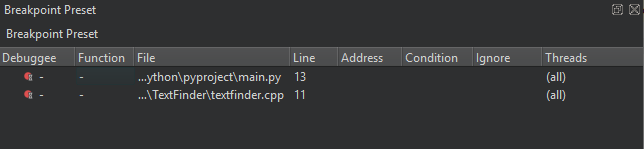
- 右键单击视图,并在上下文菜单中选择“Add Breakpoint ”。
- 双击视图中的空白区域。
- 在“Breakpoint type ”中,选择应用程序代码中希望应用程序暂停的位置。
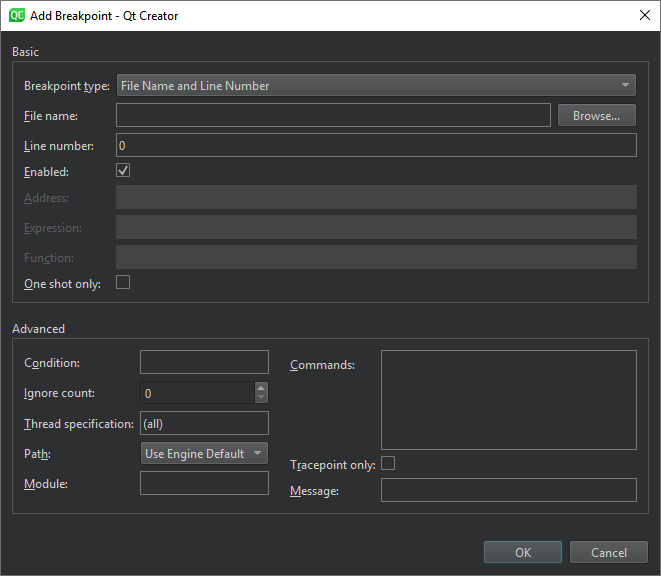
清除“Enabled ”可使断点暂时失效,就像您已将其删除一样,但会保留有关断点的信息,以便您稍后再次启用它。
其他需要指定的选项取决于您选择的位置,例如文件名和行号、地址、表达式或函数名。下表总结了高级选项。
| 选项 | 值 |
|---|---|
| Condition | 如果在断点处停止之前,条件评估结果为true ,则执行该条件。 |
| Ignore count | 在应用程序停止之前忽略该断点的次数。 |
| Thread specification | |
| Path | 确定设置断点时如何指定路径:
|
| Module | 为函数或文件类型断点指定模块(库或可执行文件的基名),以加快调试器启动速度(CDB、LLDB)。 |
| Commands | 应用程序暂停时要执行的命令。每行列出一个命令。GDB 将按您指定的顺序执行这些命令。 |
| Tracepoint only | 跟踪点可让您在无需添加日志语句或修改代码的情况下记录应用程序信息。您可以为跟踪点设置条件。 |
| Message | 要在“应用程序输出”中显示的跟踪点消息。 |
Copyright © The Qt Company Ltd. and other contributors. Documentation contributions included herein are the copyrights of their respective owners. The documentation provided herein is licensed under the terms of the GNU Free Documentation License version 1.3 as published by the Free Software Foundation. Qt and respective logos are trademarks of The Qt Company Ltd in Finland and/or other countries worldwide. All other trademarks are property of their respective owners.
