
更改编辑器颜色
您可以为文本编辑器选择预定义的配色方案之一,或创建自定义配色方案。
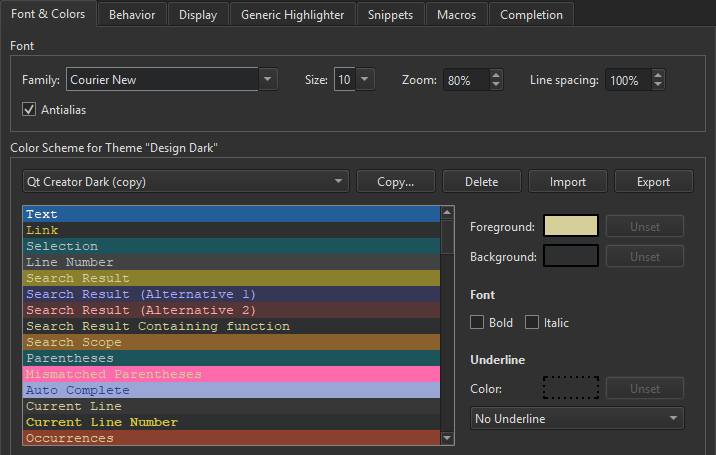
要创建配色方案:
- 选择“Preferences ” > “Text Editor ” > “Font & Colors ” > “Copy ”。
- 为配色方案输入名称,然后选择“OK ”。
- 在“Foreground ”字段中,指定所选代码元素或消息的颜色。
- 在“Background ”字段中,为代码元素或消息选择背景颜色。
“Text ”元素的背景色决定了代码编辑器的背景色。
- 在“Font ”中,选择“Bold ”或“Italic ”,以将所选代码元素或消息的文本格式化为粗体或斜体。
- 在“Underline ”中,选择用于给代码元素或消息添加下划线的颜色和样式。
从Qt Creator 复制代码时,系统会同时以纯文本和 HTML 格式进行复制。HTML 格式可确保在粘贴到富文本编辑器时保留语法高亮效果。
导出和导入配色方案
若要与他人共享配色方案,请将其导出并导入为 XML 文件。要导出配色方案,请选择“Preferences ”>“Text Editor ”>“Font & Colors ”>“Export ”,然后选择 XML 文件的文件名和保存位置。
要导入配色方案,请选择“Import ”,然后选择要导入的 XML 文件。在“Import Color Scheme ”对话框中,在“Color scheme name ”字段中输入配色方案的名称:
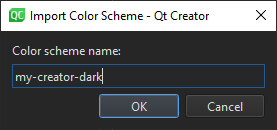
当您选择“OK ”时,该配色方案将被添加到“Font & Colors ”选项卡中的配色方案列表中。
另请参阅 《操作指南:配置编辑器》、《配置编辑器》和《编辑器》。
Copyright © The Qt Company Ltd. and other contributors. Documentation contributions included herein are the copyrights of their respective owners. The documentation provided herein is licensed under the terms of the GNU Free Documentation License version 1.3 as published by the Free Software Foundation. Qt and respective logos are trademarks of The Qt Company Ltd in Finland and/or other countries worldwide. All other trademarks are property of their respective owners.
