
美化源代码
美化代码是指对源代码文件应用缩进和样式。使用实验性的 Beautifier 插件,通过以下外部工具对源代码进行格式化:
“美化器”插件会将源代码解析为各组成部分结构(例如赋值语句、if 代码块、循环等),并根据“美化器”首选项对它们进行格式化。您可以使用预定义的样式,也可以自定义样式。
若要在保存文件时自动对其进行格式化:
- 下载并安装用于格式化源代码的工具:
注意: 在某些平台上,您 可能需要从源代码编译这些工具。
- 启用 Beautifier 插件。
注意:自 Qt Creator 10.0.0起 ,ClangFormat插件默认处于启用状态。请前往Preferences >C++ >Formatting mode ,并选择Disable 以禁用ClangFormat——因为若同时启用这两个插件,可能会导致意外结果。
- 请前往Preferences >Beautifier >General 选择要使用的工具。
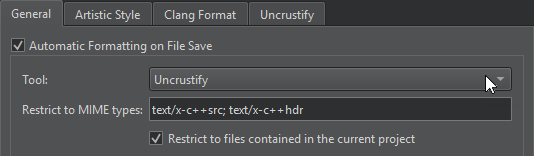
- 选择“Automatic formatting on file save ”,即可在使用“Tool ”字段中选定的工具保存文件时自动美化文件。
若要在保存文件时临时禁用此设置,请转至“File ”,然后选择“Save Without Formatting ”。
- 转到“Artistic Style ”、“ClangFormat ”或“Uncrustify ”,以设置工具可执行文件的路径,并选择定义要使用样式的配置文件。
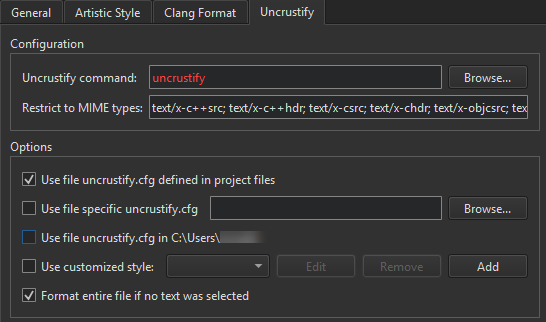
Beautifier Uncrustify 首选项
格式化当前打开的文件
转到Tools >Beautifier >Artistic Style 、ClangFormat 或Uncrustify ,以选择用于格式化当前文件中文本的操作。
您可以为这些操作创建键盘快捷键。
访问Format Current File 以格式化当前打开的文件。
使用 ClangFormat 对光标位置进行格式化
在未选中任何文本时,转至Tools >Beautifier >ClangFormat >Format at Cursor ,以对光标下的语法实体进行格式化。
访问Format Line(s) 以格式化所选行。
转至Disable Formatting for Selected Text ,将选定行包裹在// clang-format off 和// clang-format on 中。
使用 Uncrustify 格式化所选文本
当未选中任何文本时,转至“Tools ” > “Beautifier ” > “Uncrustify ” > “Format Selected Text ”,默认对整个文件进行格式化。
若要关闭此功能,请在Preferences >Beautifier >Uncrustify 中清空Format entire file if no text was selected 字段。
Copyright © The Qt Company Ltd. and other contributors. Documentation contributions included herein are the copyrights of their respective owners. The documentation provided herein is licensed under the terms of the GNU Free Documentation License version 1.3 as published by the Free Software Foundation. Qt and respective logos are trademarks of The Qt Company Ltd in Finland and/or other countries worldwide. All other trademarks are property of their respective owners.
