
更改文本编码
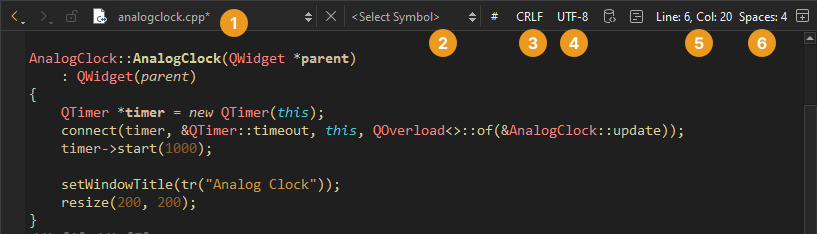
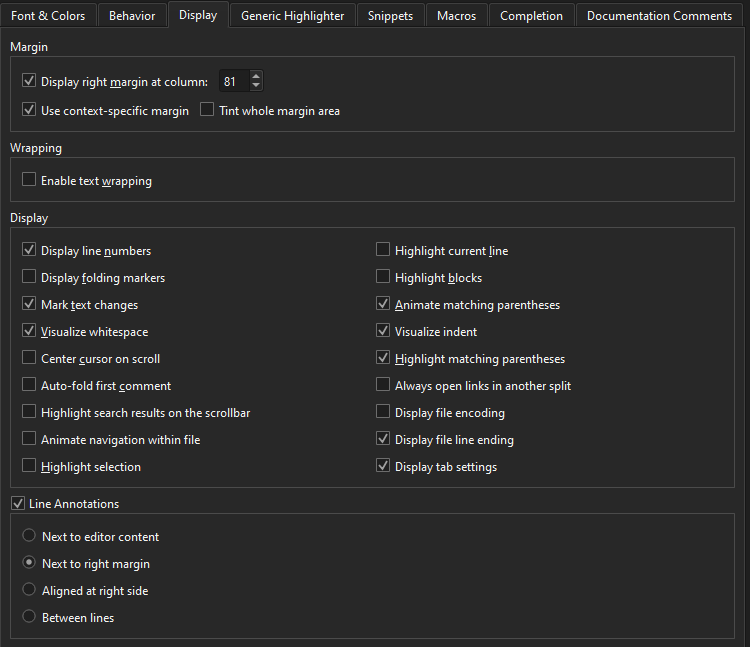
要在“Edit ”模式下,在编辑器工具栏(4)上显示当前文件的编码,请依次进入:Preferences >Text Editor >Display >Display file encoding 。
要更改文本编码,请在工具栏上选择该文件,然后在“Text Encoding ”对话框中选择新的编码:
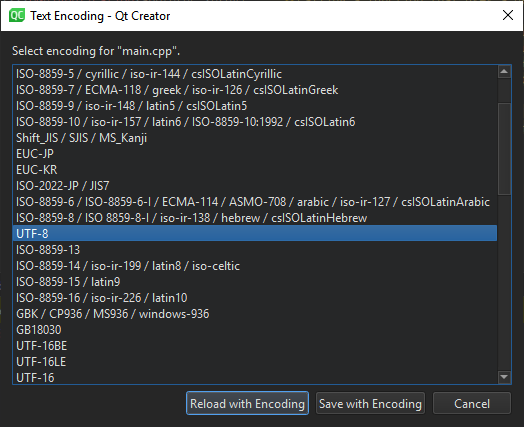
若要以所选编码重新加载文件,请选择“Reload with Encoding ”。
若要以新编码保存文件,请转至“Save with Encoding ”。
设置默认编码
要定义默认文件编码,请选择“Preferences ” > “Text Editor ” > “Behavior ”,然后在“Default encoding ”中选择合适的选项。
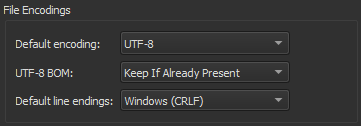
Qt 要求源文件采用 UTF-8 编码,因此默认编码已设置为UTF-8 。
如果您尝试编辑非 UTF-8 编码的文件,将看到以下错误信息:Error: Could not decode "filename" with "UTF-8"-encoding. Editing not possible.
要解决此问题,请使用文件转换工具将文件编码转换为 UTF-8。否则,字符串常量的转换可能无法按预期将QString 转换为 UTF-8。
如果您不开发 Qt 应用程序,可以将其他编码选项设置为默认编码。选择“System ”选项以使用系统所用的文件编码。
另请参阅 《操作指南:编辑代码》、《编辑代码》和《行为》。
Copyright © The Qt Company Ltd. and other contributors. Documentation contributions included herein are the copyrights of their respective owners. The documentation provided herein is licensed under the terms of the GNU Free Documentation License version 1.3 as published by the Free Software Foundation. Qt and respective logos are trademarks of The Qt Company Ltd in Finland and/or other countries worldwide. All other trademarks are property of their respective owners.
