
配置 SSH 连接
为保护Qt Creator 与设备之间的连接,请在计算机上安装OpenSSH套件,该套件包含ssh 、sftp 和ssh-keygen 工具。
如果可能,应通过以主模式运行的 OpenSSH 客户端建立 SSH 连接。 默认情况下,单个 SSH 连接会共享多个会话。先建立一次连接,然后在后续的运行和部署过程中重复使用该连接,可以减少连接建立的开销,特别是在嵌入式设备上。由于 Windows 不支持连接共享,因此每次部署或运行操作都会创建一个新的 SSH 连接。
要设置工具安装目录的路径:
- 转至“Preferences ” > “Devices ” > “SSH ”。
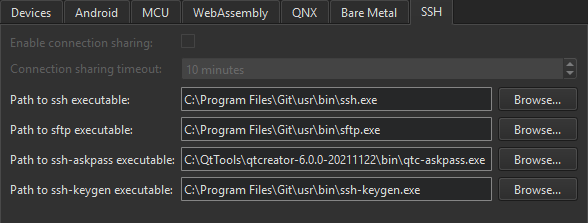
- 清除“Enable connection sharing ”选项,以便为每次部署和运行操作创建新的 SSH 连接。在 Windows 系统上,由于不支持连接共享,此选项将显示为灰色。
- 在“Connection sharing timeout ”中,以分钟为单位指定 SSH 连接的复用超时时间。
- 在“Path to ssh executable ”中,输入 OpenSSH 可执行文件安装目录的路径。
- 在“Path to sftp executable ”中,输入 SFTP 可执行文件的安装目录路径。
- 在“Path to ssh-askpass executable ”中,输入 ssh-askpass 可执行文件的安装目录路径。通常,您可以使用默认路径,该路径指向随Qt Creator 一起提供的工具 qtc-askpass。
- 在Path to ssh-keygen executable 中,输入ssh-keygen可执行文件的安装目录路径。
另请参阅 《操作指南:为远程 Linux 设备开发》和《为远程 Linux 设备开发》。
Copyright © The Qt Company Ltd. and other contributors. Documentation contributions included herein are the copyrights of their respective owners. The documentation provided herein is licensed under the terms of the GNU Free Documentation License version 1.3 as published by the Free Software Foundation. Qt and respective logos are trademarks of The Qt Company Ltd in Finland and/or other countries worldwide. All other trademarks are property of their respective owners.
