
创建 Android 虚拟设备 (AVD)
要在 Linux、macOS 或 Windows 上模拟 Android 设备,请使用 Android 模拟器。Android 模拟器会在一个名为 Android 虚拟设备 (AVD) 的虚拟机中运行 Android 操作系统。
您可以为以下场景创建 AVD:
- 汽车
- 桌面
- 手机
- 平板电脑
- 电视
- 可穿戴设备
要创建一个新的 AVD:
- 访问Preferences >Devices 。
- 选择Add >Android Device >Start Wizard 。
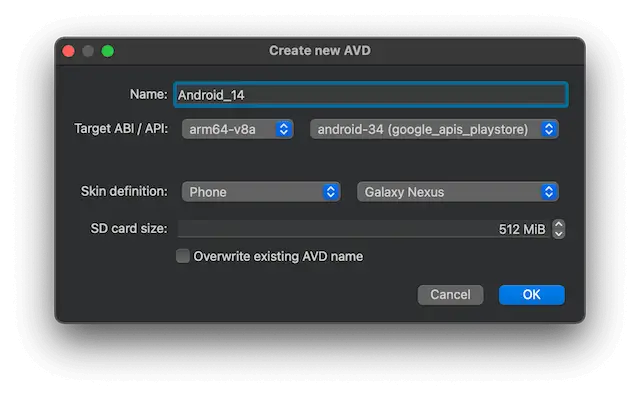
- 在“Name ”中,为 AVD 命名。
- 在“Target ABI / API ”中,选择您在计算机上安装的 Android 系统映像架构 (ABI) 和API 级别。
- 在“Skin definition ”中,选择 AVD 类型,然后选择一个预定义的 AVD 皮肤,或选择“Custom ”以创建自定义 AVD 皮肤。
- 在“SD card size ”中,设置 AVD 的 SD 卡大小。
- 选择“Override existing AVD name ”以使用同名的新 AVD 覆盖现有 AVD(
avdmanager-f选项)。 - 选择“OK ”以创建 AVD。
若需创建新 AVD 的更多高级选项,请使用命令行工具avdmanager或 Android Studio 自带的 AVD 管理器界面。
可通过以下任一方式访问已创建并已连接的 AVD 上的文件:
- 转到“File ” > “Open From Device ”。
- 转到“File System ”视图,并在菜单中选择该 AVD。
- 使用定位器。
另请参阅 《如何:为 Android 开发》和《Android 开发》。
Copyright © The Qt Company Ltd. and other contributors. Documentation contributions included herein are the copyrights of their respective owners. The documentation provided herein is licensed under the terms of the GNU Free Documentation License version 1.3 as published by the Free Software Foundation. Qt and respective logos are trademarks of The Qt Company Ltd in Finland and/or other countries worldwide. All other trademarks are property of their respective owners.
