
在 Android 设备上调试
您可以使用 LLDB 对使用 Qt 5.15.9 或更高版本以及 Qt 6.2 或更高版本开发的 Android 设备上的应用程序进行调试。
Qt Creator 的近期版本在 Android 上使用 LLDB 进行原生(C++)调试时存在问题。
此问题已在Qt Creator 17.0.1 中修复。若要在早期版本中解决此问题,请转至Preferences >Debugger >GDB ,并在Additional Attach Commands 中添加以下内容。
settings set plugin.jit-loader.gdb.enable off
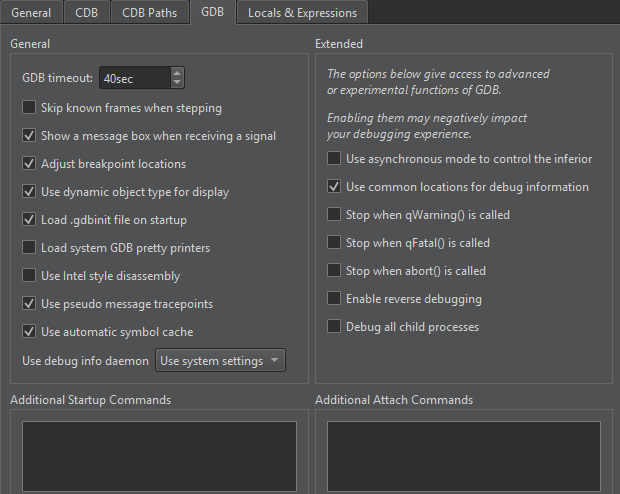
在设备上启用调试
在不同的 Android 设备上,启用调试的方式各不相同。请在Developer Options 下查找USB Debugging 。在Settings >About 中多次点击Build number ,以显示Developer Options 。
选择一个调试构建配置
转至Projects >Build Settings ,并在Active build configuration 中选择一个调试构建配置,以构建用于调试的应用程序。
解决与第二个调试器的冲突
Qt Creator 如果 Android Studio 正在运行,则无法在 Android 设备上调试应用程序。如果“应用程序输出”中出现以下消息,请关闭 Android Studio 并重试:
Ignoring second debugger -accepting and dropping.
使用 Android 模拟器
要在 Linux、macOS 或 Windows 上模拟 Android 设备,请使用 Android 模拟器。Android 模拟器会在名为“Android 虚拟设备”(AVD)的虚拟机中运行 Android 操作系统。
另请参阅 《如何:进行 Android 开发》、《Android 开发》以及《配置设备上的开发者选项》。
Copyright © The Qt Company Ltd. and other contributors. Documentation contributions included herein are the copyrights of their respective owners. The documentation provided herein is licensed under the terms of the GNU Free Documentation License version 1.3 as published by the Free Software Foundation. Qt and respective logos are trademarks of The Qt Company Ltd in Finland and/or other countries worldwide. All other trademarks are property of their respective owners.
