
创建 OpenGL 和 Vulkan 着色器
Qt 支持在所有平台上与 OpenGL 和 Vulkan 实现进行集成,因此您可以将硬件加速的 3D 图形与更传统的用户界面结合显示。有关更多信息,请参阅 Qt GUI。
您可以使用 QOpenGLShader 类来编译使用 OpenGL 着色语言 (GLSL) 和 OpenGL/ES 着色语言 (GLSL/ES) 编写的 OpenGL 着色器。QOpenGLShader 和 QOpenGLShaderProgram 使您无需关注顶点着色器和片段着色器的编译与链接细节。
要创建 OpenGL 或 Vulkan 着色器:
- 选择“File ” > “New File ” > “GLSL ”。
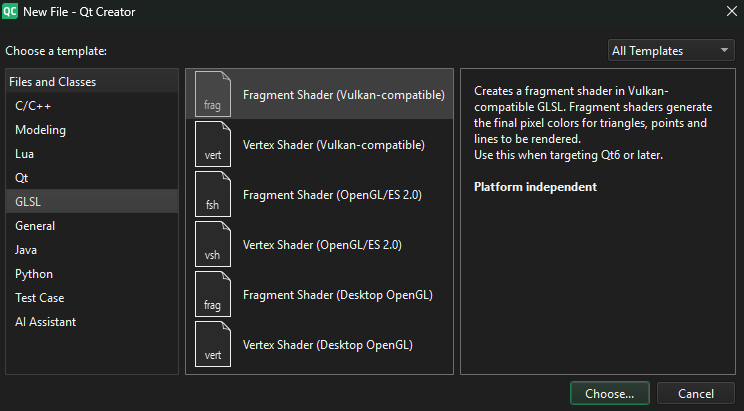
- 选择要创建的着色器类型,然后选择“Choose ”。
- 按照向导的指示创建着色器文件。
- 在代码编辑器中打开着色器文件,并使用 GLSL、GLSL/ES 或与 Vulkan 兼容的 GLSL 编写着色器代码。代码编辑器为这些文件提供语法高亮和代码补全功能。
Copyright © The Qt Company Ltd. and other contributors. Documentation contributions included herein are the copyrights of their respective owners. The documentation provided herein is licensed under the terms of the GNU Free Documentation License version 1.3 as published by the Free Software Foundation. Qt and respective logos are trademarks of The Qt Company Ltd in Finland and/or other countries worldwide. All other trademarks are property of their respective owners.
