
筛选文档
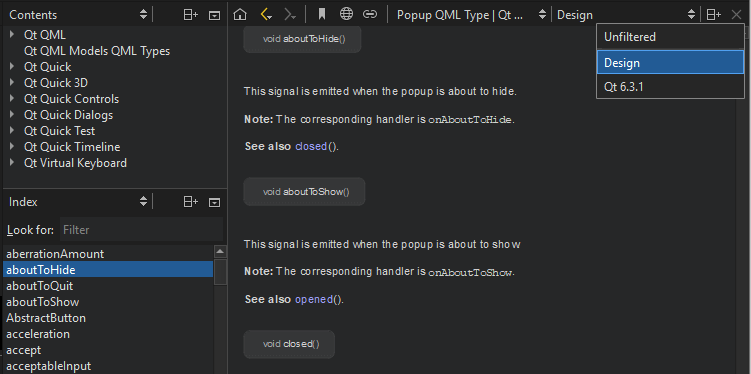
在“Help ”模式下筛选文档,以更快地查找相关信息。从筛选器列表中选择一个筛选器。侧边栏中的“Index ”和“Contents ”视图内容将相应地发生变化。
添加筛选条件
定义自定义筛选条件,以显示特定 Qt 模块和版本的文档。
要添加筛选器:
- 转至Preferences >Help >Filters 。
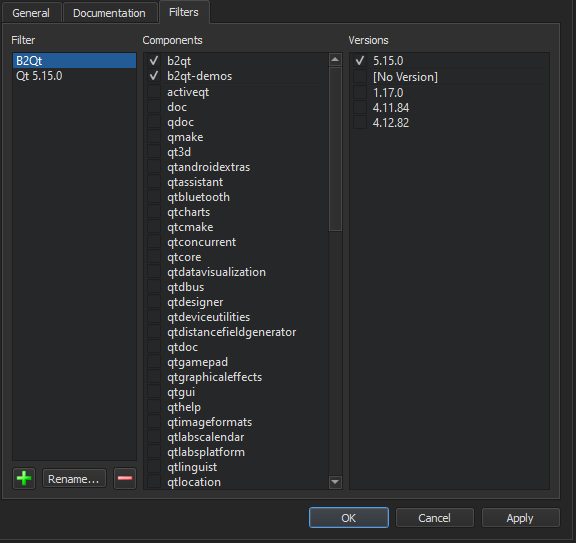
- 在“Add Filter ”对话框中,选择“
 ”(Add Filter )以添加新过滤器。
 - 在“Filter name ”中,输入过滤器的名称,然后选择“OK ”返回“Filters ”选项卡。
- 在“Components ”中,选择要包含在过滤器中的 Qt 模块。
- 在“Versions ”中,选择要包含在过滤器中的 Qt 版本。
- 选择“OK ”。
- 在“Help ”模式下,从过滤器列表中选择该过滤器,即可在侧边栏中查看经过过滤的文档。
更改过滤器
要修改所选过滤器,请添加和删除 Qt 模块及版本,然后选择“Apply ”。
要重命名所选过滤器,请选择“Rename ”。
删除过滤器
要删除所选筛选器,请选择“ ”(Remove Filter )。
另请参阅 《如何:阅读文档》。
Copyright © The Qt Company Ltd. and other contributors. Documentation contributions included herein are the copyrights of their respective owners. The documentation provided herein is licensed under the terms of the GNU Free Documentation License version 1.3 as published by the Free Software Foundation. Qt and respective logos are trademarks of The Qt Company Ltd in Finland and/or other countries worldwide. All other trademarks are property of their respective owners.
