
在 Qt 文档中查找信息
Qt Creator 安装程序、Qt Online Installer 以及其他 Qt 交付成果会将文档以.qch 文件的形式进行安装。请在“Help ”模式下查看文档。若要在线查看当前打开的文档,请选择“ ”(Open Online Documentation )。
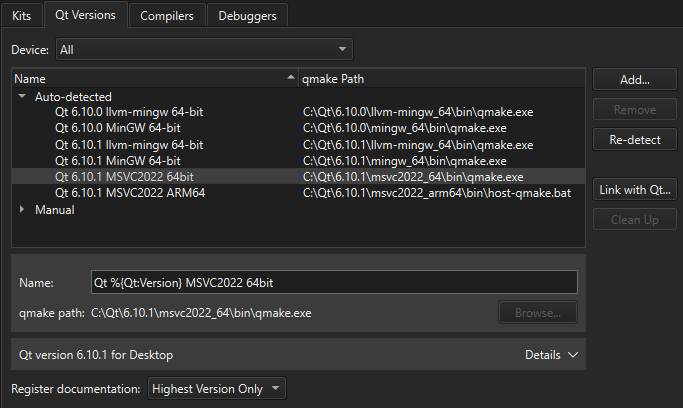
默认情况下,Qt Creator 仅会为每个已安装的 Qt 模块注册最新版本的文档。若要注册所有已安装的文档,请转至Preferences >Kits >Qt Versions ,并在Register documentation 中选择一个选项。
帮助模式侧边栏视图
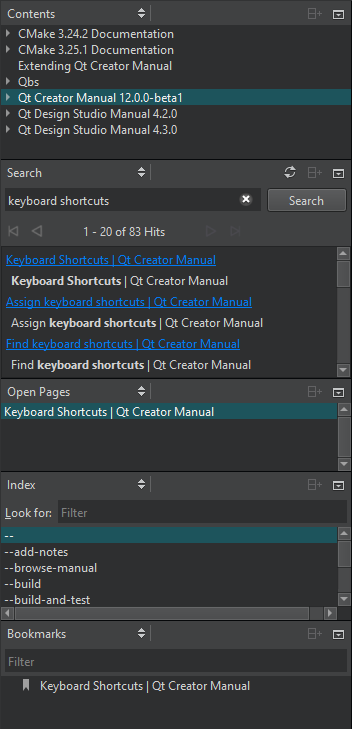
要在“Help ”模式下查找文档信息,请选择:
- Bookmarks 查看您已添加书签的页面列表。
- Contents 查看开发电脑上安装的所有文档,并浏览文档内容。
- Index 根据关键词列表在所有已安装文档中查找信息。
- Open Pages 查看当前打开的文档页面列表。
- Search 从所有已安装的文档中进行搜索。
另请参阅 《操作指南:阅读文档》、《安装》以及《获取并安装 Qt》。
Copyright © The Qt Company Ltd. and other contributors. Documentation contributions included herein are the copyrights of their respective owners. The documentation provided herein is licensed under the terms of the GNU Free Documentation License version 1.3 as published by the Free Software Foundation. Qt and respective logos are trademarks of The Qt Company Ltd in Finland and/or other countries worldwide. All other trademarks are property of their respective owners.
