
安装
您可以通过以下方式安装Qt Creator 的商业版或开源版:
- 作为 Qt 安装的一部分,通过 Qt Online Installer.
- 作为独立工具安装。
您可以在同一系统上安装并运行多个Qt Creator 版本,并并行使用它们。
Qt Online Installer
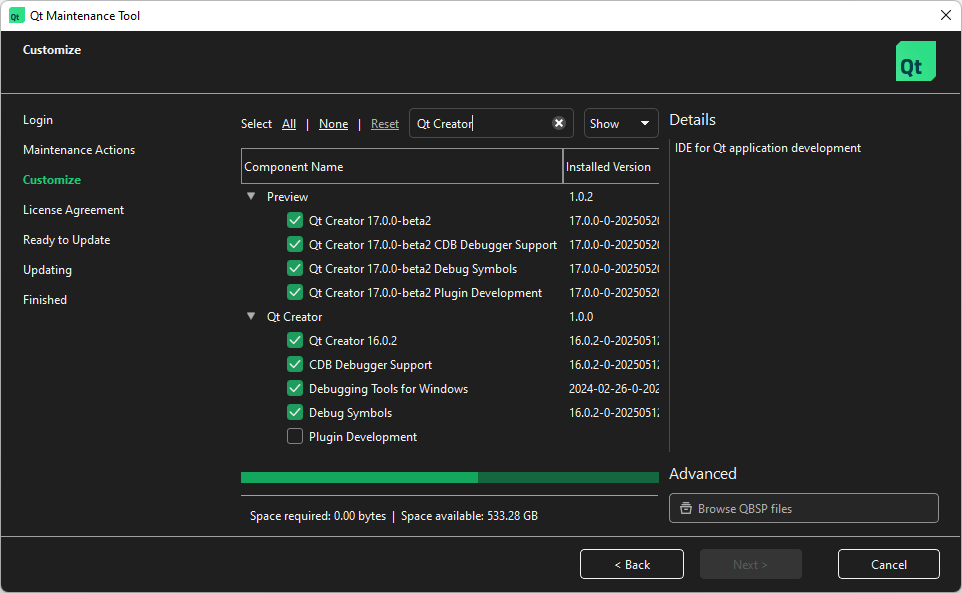
Qt Online Installer 根据发布周期,Qt Creator 既提供最新发布的正式版,也提供即将发布的测试版或候选版。
请在Qt Online Installer 中搜索“Qt Creator ”,以查找可用的版本。
注意:您 需要一个Qt 帐户才能使用Qt Online Installer 。
如果您开发Qt Quick 应用程序,请考虑同时安装Qt Design Studio 。
独立版本Qt Creator
您可以通过以下方式获取Qt Creator 的开源版本:
- 使用软件包管理器
- 下载安装包
- 从源代码编译Qt Creator
按照您系统惯用的方式启动Qt Creator 安装程序,并按照其提示安装Qt Creator 。
若要使用 Qt 进行开发,您还需要一个 Qt 版本。您可以在独立版的Qt Creator 中注册 Qt 版本,以便在套件中使用它们。
使用软件包管理器
包管理器提供的Qt Creator 软件包不受官方支持。有关官方发布版的链接,请参阅“下载安装包”。
在 Windows 上,您可以使用chocolatey ;在 macOS 上,您可以使用brew 。这些包管理器会安装网上可用的最新Qt Creator 版本。也就是说,它们会获取 7zip 压缩包并在您的系统上解压。
例如,在 Windows 上,请输入:
choco install qtcreator
而在 macOS 上,请输入:
brew install --cask qt-creator
注意:某些 Linux 发行版可能预装了旧版本的Qt Creator ,因此建议您下载并安装最新版本。
下载安装包
您可以从以下地址下载Qt Creator 安装包:
- 官方发布版
- 您的Qt 账户(开源和商业版)
- 当前及即将发布的版本快照
- GitHub
从源代码构建
若要测试最新版本的Qt Creator (可能包含您自己的修改),您可以从源代码进行编译。有关更多信息,请参阅《编译Qt Creator》和《从Git构建Qt Creator 》。
另请参阅 《如何:管理套件》、《注册已安装的 Qt 版本》、《安装插件》以及《许可与致谢》。
Copyright © The Qt Company Ltd. and other contributors. Documentation contributions included herein are the copyrights of their respective owners. The documentation provided herein is licensed under the terms of the GNU Free Documentation License version 1.3 as published by the Free Software Foundation. Qt and respective logos are trademarks of The Qt Company Ltd in Finland and/or other countries worldwide. All other trademarks are property of their respective owners.
