
格式化 CMake 文件
您可以使用cmake-format工具以及本地配置文件.cmake-format 、.py 或.json ,对 CMake 文件中未用一对围栏括起的任何文本进行格式化。您必须安装该工具,并告知Qt Creator 其安装路径。
若要在保存文件时自动格式化 CMake 文件:
- 选择“Preferences ” > “CMake ” > “Formatter ”。
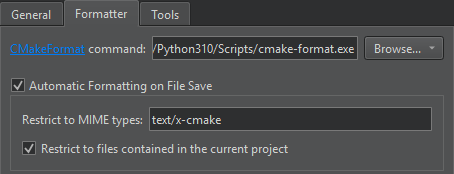
- 在“CMakeFormat command ”中,输入“
cmake-format.exe”的路径。 - 选中“Automatic formatting on file save ”选项,即可在保存 CMake 文件时自动对其进行格式化。
若要在保存文件时临时禁用此设置,请转至“File ”,然后选择“Save Without Formatting ”。
- 在“Restrict to MIME types ”中,添加待格式化的文件的 MIME 类型,用分号分隔。默认值“
text/x-cmake”用于格式化 CMake 文件。如果该字段为空,则所有文件都会被格式化。 - 选择“Restrict to files contained in the current project ”仅格式化属于当前项目的 CMake 文件。
另请参阅 《如何:使用 CMake 构建》、《编辑 MIME 类型》和《CMake》。
Copyright © The Qt Company Ltd. and other contributors. Documentation contributions included herein are the copyrights of their respective owners. The documentation provided herein is licensed under the terms of the GNU Free Documentation License version 1.3 as published by the Free Software Foundation. Qt and respective logos are trademarks of The Qt Company Ltd in Finland and/or other countries worldwide. All other trademarks are property of their respective owners.
