
获取帮助
Qt Creator 通过Qt Help 插件,已与Qt文档和示例完全集成。
- 要查看文档,请切换到Help 模式。
- 要以工具提示的形式查看有关 Qt 类或函数的上下文相关帮助,请将鼠标光标移到该类或函数上。如果没有帮助信息,工具提示将显示该符号的类型信息。
- 若要显示函数签名的工具提示(无论光标在函数调用中的位置如何),请按Ctrl+Shift+D。
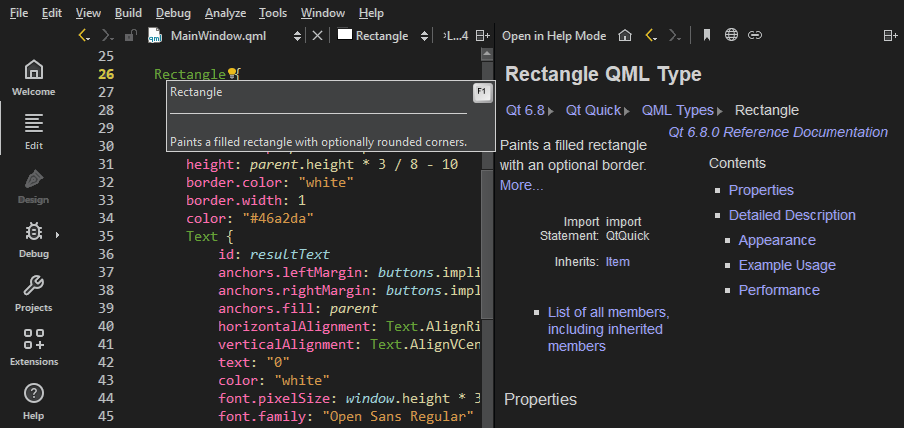
- 要显示 Qt 类或函数的完整帮助,请按F1 键或在上下文菜单中选择“Context Help ”。文档将显示在代码编辑器旁边的视图中;如果垂直空间不足,则会以全屏Help 模式显示。
- 若要更改文档在“Help ”模式下的显示方式,请转至“Preferences ” > “Help ”。
下图展示了Edit 模式下的上下文相关帮助。
更改字体
如果帮助 HTML 文件未使用样式表,您可以在“Preferences ”>“Help ”>“General ”中更改字体家族和字号。
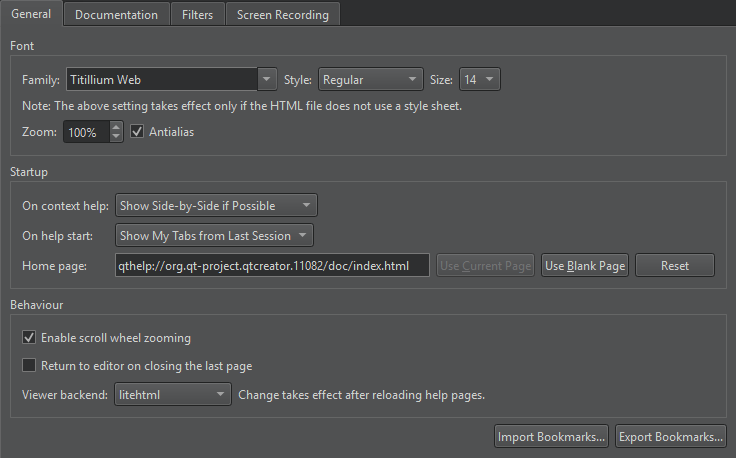
在“Zoom ”中设置默认缩放级别。查看帮助页面时,可使用鼠标滚轮进行缩放。若要关闭此功能,请取消勾选“Enable scroll wheel zooming ”。
若要关闭抗锯齿,请取消勾选Antialias 。
返回编辑器
若要在关闭最后一个帮助页面时切换到编辑器上下文,请选中Return to editor on closing the last page 。
选择帮助查看器后端
帮助查看器后端决定用于显示帮助文件的样式表。建议使用基于 litehtml 的默认帮助查看器后端来查看 Qt 文档。您可以在“Viewer backend ”中选择其他帮助查看器后端。
显示函数工具提示
若要默认隐藏函数工具提示:
- 转到“Preferences ” > “Text Editor ” > “Behavior ”。
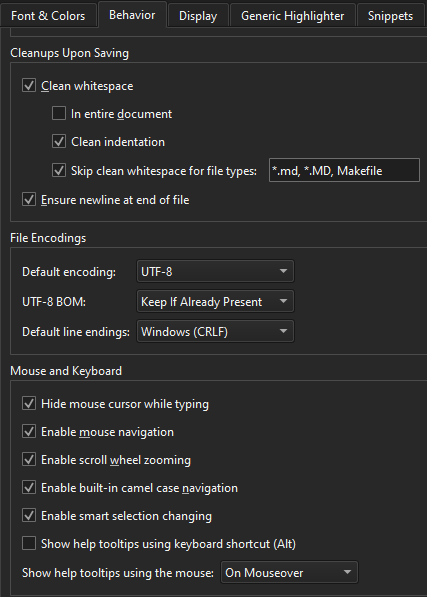
- 在“Show help tooltips using the mouse ”中,选择“On Shift+Mouseover ”。
您仍可通过按住Shift键来查看工具提示。
若要使用键盘快捷键查看帮助工具提示,请选择“Show help tooltips using keyboard shortcut (Alt) ”。
另请参阅 “操作指南:阅读文档”。
Copyright © The Qt Company Ltd. and other contributors. Documentation contributions included herein are the copyrights of their respective owners. The documentation provided herein is licensed under the terms of the GNU Free Documentation License version 1.3 as published by the Free Software Foundation. Qt and respective logos are trademarks of The Qt Company Ltd in Finland and/or other countries worldwide. All other trademarks are property of their respective owners.
