
将核心文件加载到调试器中
如果系统已配置允许此功能,可使用核心模式检查在 Linux 和 Unix 系统上由崩溃进程生成的核心文件(崩溃转储)。
获取核心文件
要在 Unix 系统上启用核心文件的转储功能,请在启动应用程序的 shell 中输入以下命令:
ulimit -c unlimited附加到核心文件
要以核心模式启动调试器:
- 转至“Debug ” > “Start Debugging ”,然后选择“Load Core File ”。
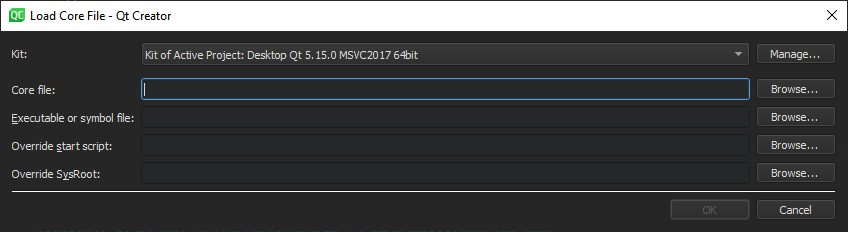
- 在“Kit ”中,选择用于构建产生该核心文件二进制文件的构建和运行套件。如果核心文件源自非通过“Qt Creator ”构建的二进制文件,或非由“Qt Creator ”启动的进程,请选择一个在指定设备、工具链、调试器和 sysroot 方面尽可能与实际设置相匹配的套件。
- 在Core file 中,指定要检查的核心文件。
- 在Executable of symbol file 中,指定一个包含与核心文件对应调试信息的文件。通常,该文件是可执行文件,或者如果调试信息与可执行文件分开存储,则为
.debug文件。 - 在Override start script 中,指定一个脚本文件,以代替默认的启动脚本。
- 在Override SysRoot 中,指定要使用的
sysroot的路径,以代替默认的sysroot。
为了获得更好的结果,请使用一个配置正确的项目,其中包含发生崩溃的应用程序的源代码。
附加最新的核心文件
在 Linux 系统上,Qt Creator 使用systemd 崩溃处理机制提供的coredumpctl 命令来获取核心文件。有关详细信息,请参阅systemd-coredump。
要附加到最新的核心文件,请转至Debug >Start Debugging ,然后选择Load Last Core File 。
Copyright © The Qt Company Ltd. and other contributors. Documentation contributions included herein are the copyrights of their respective owners. The documentation provided herein is licensed under the terms of the GNU Free Documentation License version 1.3 as published by the Free Software Foundation. Qt and respective logos are trademarks of The Qt Company Ltd in Finland and/or other countries worldwide. All other trademarks are property of their respective owners.
