
管理 MCU 开发套件
注意:在 开始进行MCU开发之前 ,请访问Help >About Plugins ,并确保已启用 Qt for MCUs 插件已启用。
Qt Creator 如果您在Preferences >SDKs >MCU 中选择Automatically create kits for all available targets on start ,系统会自动为所有可用的 MCU 目标添加套件。此设置默认已选中。
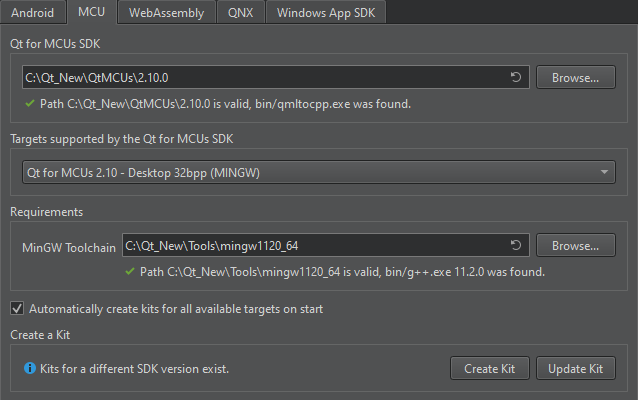
注意:当 您更新Qt for MCUs SDK时 ,Qt Creator 会询问您是替换现有套件还是创建额外套件。若要针对每个目标手动执行此操作,请选择“Update Kit ”或“Create Kit ”。
要添加新套件,请转至“Preferences ” > “SDKs ” > “MCU ”,然后选择“Create Kit ”。这将添加套件中工具包和 SDK 的路径,并在您选择“Apply ”时保持其同步。
更改或删除 MCU 套件
要更改或删除单个套件,请转至Preferences >Kits 。
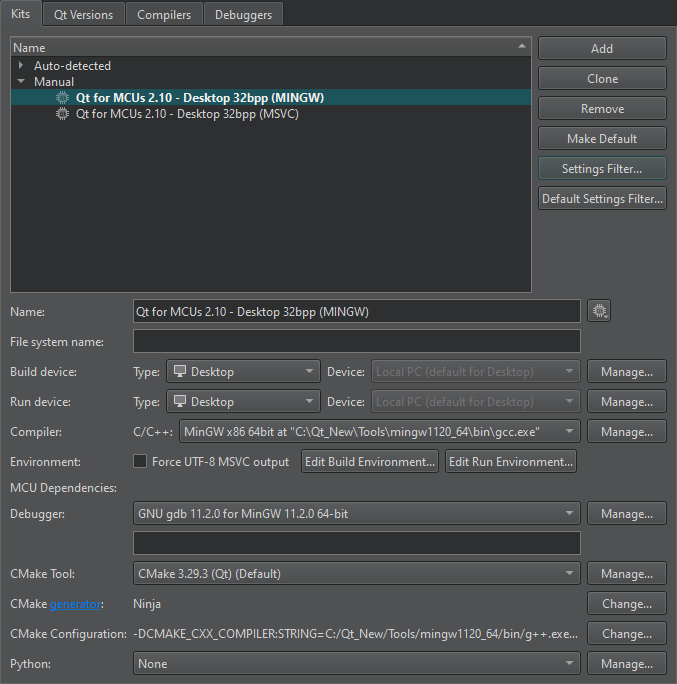
注意:在 使用早于Qt for MCUs 2.0 的Qt for MCUs 版本时, 可使用“MCU Dependencies ”筛选器来显示所选套件进行 MCU 开发所需的第三方软件路径。
另请参阅 《启用和禁用插件》、《如何:为微控制器开发》、 《如何:管理开发套件》、《为微控制器开发》以及 Qt for MCUs。
Copyright © The Qt Company Ltd. and other contributors. Documentation contributions included herein are the copyrights of their respective owners. The documentation provided herein is licensed under the terms of the GNU Free Documentation License version 1.3 as published by the Free Software Foundation. Qt and respective logos are trademarks of The Qt Company Ltd in Finland and/or other countries worldwide. All other trademarks are property of their respective owners.
