
使用正则表达式进行查找和替换
在“Search Results ”视图中使用正则表达式跨文件搜索和替换。
Qt Creator 中使用的正则表达式基于Perl正则表达式设计。有关使用正则表达式的更多信息,请参阅QRegularExpression 。
例如,要将等号检查(foo == bar )替换为函数(foo.equals(bar) ):
- 请将更改提交到版本控制系统,因为无法撤销此替换操作。
- 按Ctrl+Shift+F或依次访问Edit >Find/Replace >Advanced Find >Open Advanced Find 以打开Search Results 。
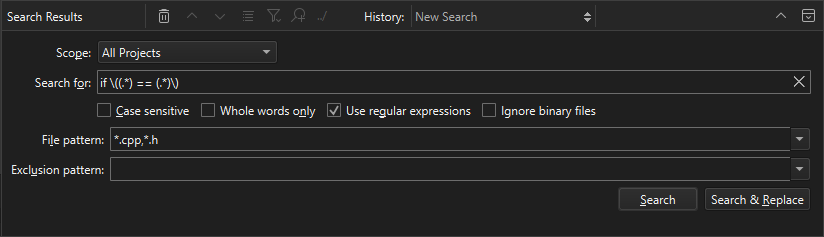
- 在“Scope ”中,选择适合您搜索的选项。
- 选择“Use regular expressions ”。
- 在“Search for ”中输入以下文本:
if \((.*) == (.*)\)
- 选择“Search & Replace ”以查看搜索结果列表。
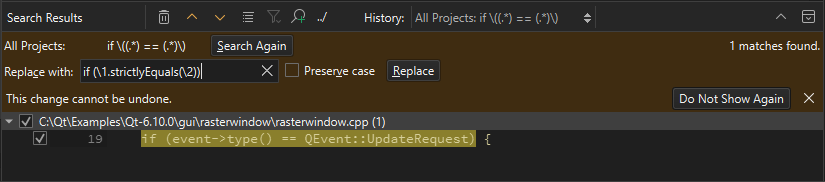
- 在“Replace with ”中,输入以下文本:
if (\1.strictlyEquals(\2))
- 选择“Replace ”以替换所有该文本的出现位置。
另请参阅 《操作指南:编辑代码》、《操作指南:搜索》和《编辑代码》。
Copyright © The Qt Company Ltd. and other contributors. Documentation contributions included herein are the copyrights of their respective owners. The documentation provided herein is licensed under the terms of the GNU Free Documentation License version 1.3 as published by the Free Software Foundation. Qt and respective logos are trademarks of The Qt Company Ltd in Finland and/or other countries worldwide. All other trademarks are property of their respective owners.
