
重命名符号
您可以重命名项目中所有文件中的符号。
重命名 C++ 符号
重命名类时,还可以更改与该类名称匹配的文件名。
要在项目中重命名 C++ 符号:
- 将光标置于编辑器中的符号上。
- 转到“Tools ” > “C++ ” > “Rename Symbol Under Cursor ”,或按Ctrl+Shift+R。
使用键盘快捷键重命名 Python 符号。
重命名 QML 类型
要在项目中重命名 QML 类型:
- 转到“Tools ” > “QML/JS ” > “Rename Symbol Under Cursor ”,或按Ctrl+Shift+R。
- 转到“Projects ”,并在上下文菜单中选择“Rename ”以重命名指定 QML 类型的 QML 文件。“Qt Creator ”会询问您是否还希望重命名该项目中其他文件中该类型名称的所有用法。
替换找到的符号实例
Search Results 会显示该符号在当前项目中的位置和实例数量。
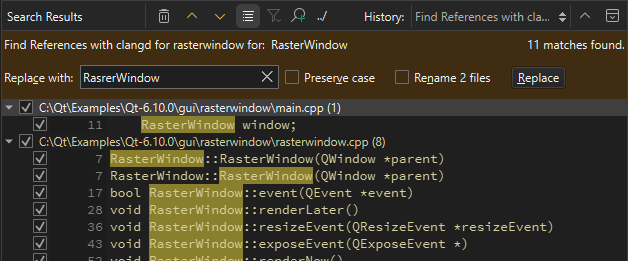
要替换所有选中的实例,请在“Replace with ”中输入新符号的名称,然后选择“Replace ”。若要跳过某个实例,请清除该实例旁边的复选框。
注意:此 操作将替换“Search Results ”中列出的所有文件中该符号的所有选定实例。此操作无法撤销。
如果该符号是一个类,请选择“Rename files ”以同时更改与类名匹配的文件名。
注意:重命名 局部符号不会打开“Search Results ”。该符号的实例会在代码中被高亮显示,您可以编辑该符号。随着您输入内容,该局部符号的所有实例都会随之更改。
另请参阅 “应用快速修复”、“查找符号”、“指定快速修复设置”、“QML 快速修复”、“快速修复”和“C++ 快速修复”。
Copyright © The Qt Company Ltd. and other contributors. Documentation contributions included herein are the copyrights of their respective owners. The documentation provided herein is licensed under the terms of the GNU Free Documentation License version 1.3 as published by the Free Software Foundation. Qt and respective logos are trademarks of The Qt Company Ltd in Finland and/or other countries worldwide. All other trademarks are property of their respective owners.
