
使用 Heob 检测内存泄漏
在 Windows 系统上,使用 Heob 堆观察器来检测缓冲区溢出和内存泄漏。
要在当前打开的项目上运行 Heob:
- 选择“Analyze ” > “Heob ”。
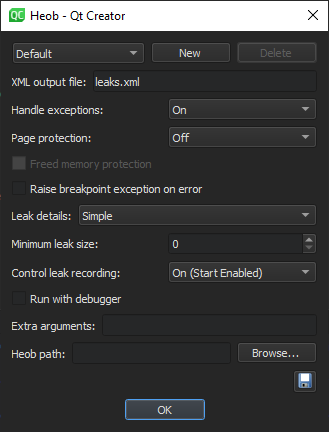
- 选择要使用的 Heob 设置配置文件,或选择“New ”以创建新配置文件。
- 在“Heob path ”中,输入 Heob 可执行文件的路径。
- 指定运行检查的设置。
- 选择“OK ”以运行 Heob。
Qt Creator 将运行应用程序,然后在终端中运行 Heob。
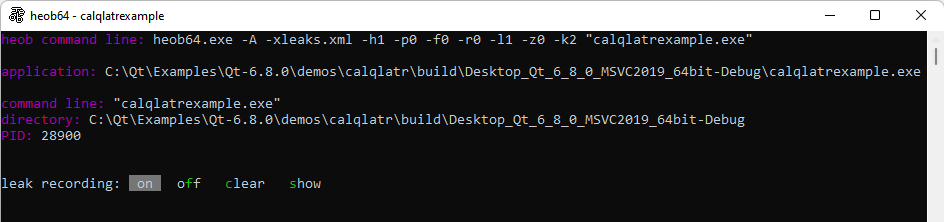
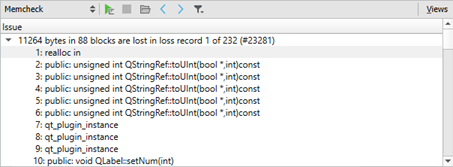
当发生缓冲区溢出时,Heob 会触发访问违规,并记录导致问题的指令和缓冲区分配的堆栈跟踪。在 Heob 正常退出后,您可以在“Memcheck ”视图中查看结果。
Copyright © The Qt Company Ltd. and other contributors. Documentation contributions included herein are the copyrights of their respective owners. The documentation provided herein is licensed under the terms of the GNU Free Documentation License version 1.3 as published by the Free Software Foundation. Qt and respective logos are trademarks of The Qt Company Ltd in Finland and/or other countries worldwide. All other trademarks are property of their respective owners.
