
使用 Cppcheck 检测 C++ 代码中的错误
启用实验性的 Cppcheck 插件,可在 C++ 编辑器中查看由 Cppcheck 工具生成的诊断信息。
Cppcheck 会在打开文件时自动运行。若要选择当前活动项目中需要检查的文件,请转至“Analyze ” > “Cppcheck ”。
分析选定的文件
- 转到“Analyze ” > “Cppcheck ”。
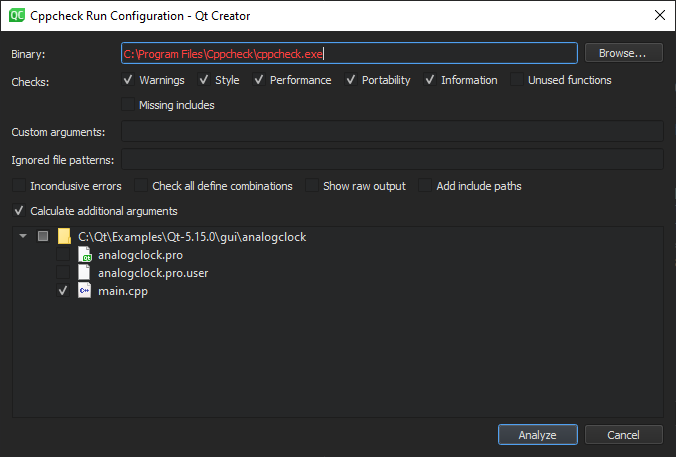
- 在“Binary ”中,输入 Cppcheck 可执行文件的路径。
- 在“Checks ”中,选择要执行的检查。
注意:默认情况下, Cppcheck 会使用多线程进行检查。选择“Unused functions ”可关闭此默认行为。
- 在“Custom arguments ”中,输入运行 Cppcheck 的附加参数。这些参数可能会被自动生成的参数覆盖。为避免配置冲突,请选择“Show raw output ”并检查最终参数。
- 在“Ignored file patterns ”中,输入过滤器以忽略匹配该模式(通配符)的文件。您可以输入多个以逗号分隔的模式。尽管 Cppcheck 不会对匹配这些模式的文件进行检查,但如果其他文件包含这些模式,它们仍可能会被隐式检查。
- 选择“Inconclusive errors ”可同时标记可能的误报。
- 选中“Check all define combinations ”以检查所有定义组合。这可能会显著降低分析速度,但有助于发现更多问题。
- 选中“Add include paths ”可将当前项目的包含路径传递给 Cppcheck。这会减慢大型项目的检查速度,但有助于 Cppcheck 发现缺失的包含文件。
- 选择“Calculate additional arguments ”可根据当前项目的设置(如所用语言和标准版本)计算附加参数,并将其传递给 Cppcheck。
- 选择要运行 Cppcheck 检查的文件。
- 选择“Analyze ”。
Qt Creator 将对所选文件运行 Cppcheck,并通过文本标记或注释显示结果。
要为自动运行的检查指定上述设置,请转到“Preferences ” > “Analyzer ” > “Cppcheck ”。
Copyright © The Qt Company Ltd. and other contributors. Documentation contributions included herein are the copyrights of their respective owners. The documentation provided herein is licensed under the terms of the GNU Free Documentation License version 1.3 as published by the Free Software Foundation. Qt and respective logos are trademarks of The Qt Company Ltd in Finland and/or other countries worldwide. All other trademarks are property of their respective owners.
