
录制文本编辑宏
当您在代码编辑器中打开文件时,可以将键盘操作序列录制为宏。随后,您可以通过播放该宏来重复该操作序列。您可以保存最新宏,并为其分配键盘快捷键以运行,或者通过定位器运行该宏。
录制宏
要录制文本编辑宏:
- 转到“Tools ” > “Text Editing Macros ” > “Record Macro ”,或按Alt+[。
- 选择键盘按键。
- 要停止录制,请转至“Tools ” > “Text Editing Macros ” > “Stop Recording Macro ”,或按Alt+]。
注意: 宏记录器 不支持代码补全。
播放宏
要播放最后一个宏:
- 转到“Tools ” > “Text Editing Macros ” > “Play Last Macro ”。
- 选择Alt+R。
- 在定位器中输入“
rm”。
保存宏
要保存最后一个宏,请转至Tools >Text Editing Macros >Save Last Macro 。
要查看和删除已保存的宏,请转到“Preferences ” > “Text Editor ” > “Macros ”。
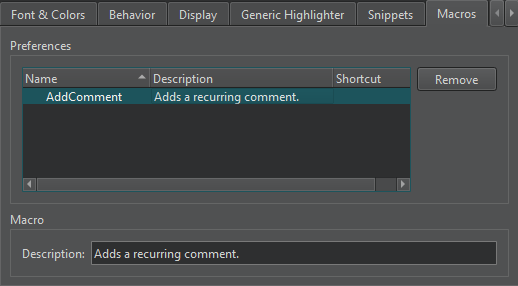
为宏分配键盘快捷键
要为文本编辑宏分配键盘快捷键,请转至Preferences >Environment >Keyboard 。
另请参阅 “设置键盘快捷键”、“创建 Lua 脚本”、“如何:编辑代码”以及“使用定位器导航”。
Copyright © The Qt Company Ltd. and other contributors. Documentation contributions included herein are the copyrights of their respective owners. The documentation provided herein is licensed under the terms of the GNU Free Documentation License version 1.3 as published by the Free Software Foundation. Qt and respective logos are trademarks of The Qt Company Ltd in Finland and/or other countries worldwide. All other trademarks are property of their respective owners.
