
设置键盘快捷键
如果缺少您常用的键盘快捷键,可以自行添加。此外,对于那些使用鼠标即可轻松完成、因此未出现在菜单中或没有默认键盘快捷键的功能,您也可以为其分配自定义键盘快捷键。例如,在编辑器中选择和删除单词或行。
要更改现有键盘快捷键或设置新的键盘快捷键:
- 选择“Preferences ” > “Environment ” > “Keyboard ”。
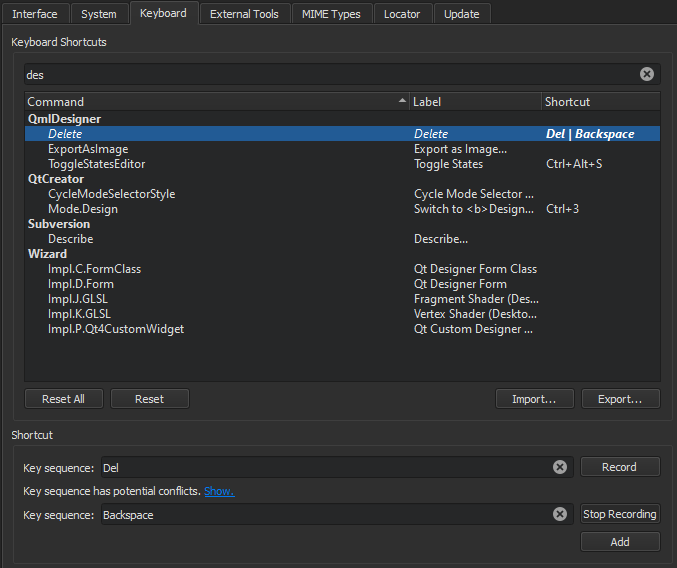
- 从列表中选择一个命令。
- 在“Key Sequence ”字段中,您有以下选项:
- 输入您希望与所选命令关联的快捷键。
- 录制键序列。
- 若要为某项功能分配多个快捷键,请选择“Add ”,然后输入或录制额外的键组合。
- 若要恢复为默认快捷键,请选择“Reset ”。
录制键序列
- 选择“Record ”。
- 选择要用作键盘快捷键的键。
- 完成后,选择“Stop Recording ”。
另请参阅 “键盘快捷键”、“查找键盘快捷键”、“导入和导出键盘快捷键”、“操作指南:调整用户界面”以及“调整用户界面”。
Copyright © The Qt Company Ltd. and other contributors. Documentation contributions included herein are the copyrights of their respective owners. The documentation provided herein is licensed under the terms of the GNU Free Documentation License version 1.3 as published by the Free Software Foundation. Qt and respective logos are trademarks of The Qt Company Ltd in Finland and/or other countries worldwide. All other trademarks are property of their respective owners.
