
查看大纲
使用“Outline ”视图,可查看源文件中已定义的类型和其他符号的概览,以及它们的属性和层次结构。
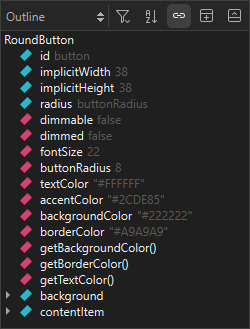
- 要查看所有绑定的完整列表,请选择“
 ”(Filter Tree )>“Show All Bindings ”。
 - 要按字母顺序对类型或符号进行排序,请选择“
 ”(Sort Alphabetically )。
 - 若要停止与编辑器中选定类型或符号的同步,请取消选中“
 ”(Synchronize with Editor )。
Copyright © The Qt Company Ltd. and other contributors. Documentation contributions included herein are the copyrights of their respective owners. The documentation provided herein is licensed under the terms of the GNU Free Documentation License version 1.3 as published by the Free Software Foundation. Qt and respective logos are trademarks of The Qt Company Ltd in Finland and/or other countries worldwide. All other trademarks are property of their respective owners.
