
查看打开的文档
使用“Open Documents ”视图可查看当前打开的文件列表。
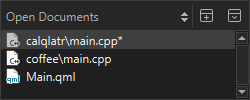
您可以使用上下文菜单,将“File ”菜单和“文件系统”视图中提供的某些功能应用于该视图中选定的文件。
此外,您还可以:
- 将文件的完整路径或仅文件名复制到剪贴板。
- 将文件固定到列表顶部,以便在选择“Close All ”时保持这些文件处于打开状态。
- 为列表中的下一份和上一份文档设置快捷键(OpenNextDocument 和OpenPreviousDocument )。
设置打开文件的偏好设置
要设置打开文件和处理已打开文件的偏好设置,请选择“Preferences ” > “Environment ” > “System ”:
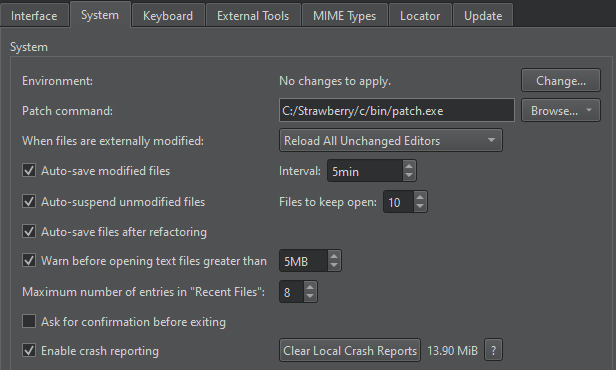
- 在“When files are externally modified ”字段中,选择是否希望系统提示您重新加载在外部被修改的已打开文件。例如,当您从版本控制系统拉取更改时。
- 选中“Auto-save modified files ”可按“Interval ”字段中指定的间隔自动保存已修改的文件。
- 选中“Auto-save files after refactoring ”复选框,可自动保存已重构的文件。
- 选中“Auto-suspend unmodified files ”复选框,可在长时间无操作后自动释放打开文件的资源。这些文件仍会显示在“Open Documents ”视图中。在“Files to keep open ”字段中设置应保存在内存中的文件最小数量。
- 选中“Warn before opening text files greater than ”可收到关于打开大型文本文件的警告。
- 在“Maximum number of entries in "Recent Files" ”字段中,设置“File >Recent Files ”中列出的最近打开的文件数量。
Copyright © The Qt Company Ltd. and other contributors. Documentation contributions included herein are the copyrights of their respective owners. The documentation provided herein is licensed under the terms of the GNU Free Documentation License version 1.3 as published by the Free Software Foundation. Qt and respective logos are trademarks of The Qt Company Ltd in Finland and/or other countries worldwide. All other trademarks are property of their respective owners.
