
为 Clang 工具设置全局首选项
使用 Clang-Tidy 和 Clazy 检测 C、C++ 和 Objective-C 程序中的问题。
要为 Clang 工具全局配置 Clang 诊断功能:
- 转至Preferences >Analyzer >Clang Tools 。
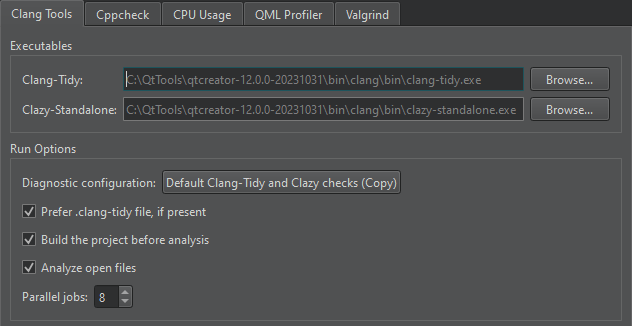
- 在“Clang-Tidy ”和“Clazy-Standalone ”字段中,设置要使用的可执行文件的路径。
- “Diagnostic configuration ”字段显示将要执行的检查。选择该字段的值可打开“Diagnostic Configurations ”对话框,您可以在其中选择和编辑要执行的检查。
若要改用 Clang-Tidy 配置文件执行检查,请选择“Prefer .clang-tidy file, if present ”。
- 若要在运行 Clang 工具前构建项目,请选择“Build the project before analysis ”。Clang 工具并不要求在分析前构建项目,但可能会显示关于构建过程中生成的文件缺失的误导性警告。对于大型项目,不构建项目可能会节省一些时间。
- 若要禁用对打开文档的自动分析,请取消勾选“Analyze open files ”。
- 在“Parallel jobs ”字段中,选择要并行运行的任务数,以便在多核处理器上加快分析速度。
另请参阅 “配置 Clang 诊断”、“使用 Clang-Tidy 和 Clazy 分析代码”、“指定 Clang 工具设置”以及“已知问题”。
Copyright © The Qt Company Ltd. and other contributors. Documentation contributions included herein are the copyrights of their respective owners. The documentation provided herein is licensed under the terms of the GNU Free Documentation License version 1.3 as published by the Free Software Foundation. Qt and respective logos are trademarks of The Qt Company Ltd in Finland and/or other countries worldwide. All other trademarks are property of their respective owners.
