
配置 Clang 诊断
使用 Clang-Tidy 和 Clazy 检测 C、C++ 和 Objective-C 程序中的问题。
要选择和编辑要执行的 Clang 检查:
- 选择“Preferences ” > “Analyzer ” > “Clang Tools ”。
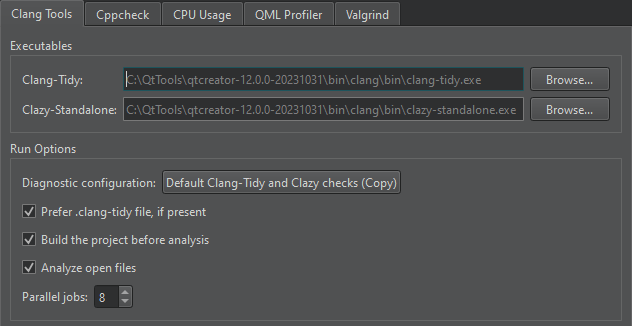
- “Diagnostic configuration ”字段显示待执行的检查项。选择该字段的值可打开“Diagnostic Configurations ”对话框,您可在其中选择并编辑待执行的检查项。
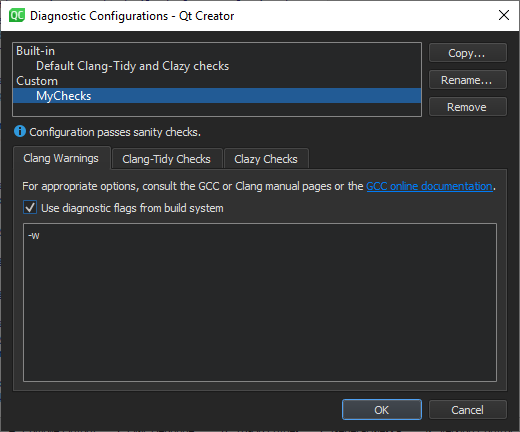
若要改用 Clang-Tidy 配置文件执行检查,请在“Clang Tools ”选项卡中选择“Prefer .clang-tidy file, if present ”。
- 选择“Copy ”(复制配置),即可将选定的诊断项复制出来以便编辑。
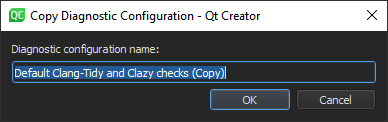
- 在“Diagnostic configuration name ”字段中,为配置命名,然后选择“OK ”。
- 在“Clang Warnings ”选项卡中,选择“Use diagnostic flags from the build system ”以将诊断标志(例如警告标志)从构建系统转发到 Clang 代码模型,以便在代码编辑器中显示注释。
- 在“Clang-Tidy Checks ”选项卡中,选择“Select Checks ”以选择要执行的检查。要筛选检查项,请在“Filter by name ”字段中输入字符串。
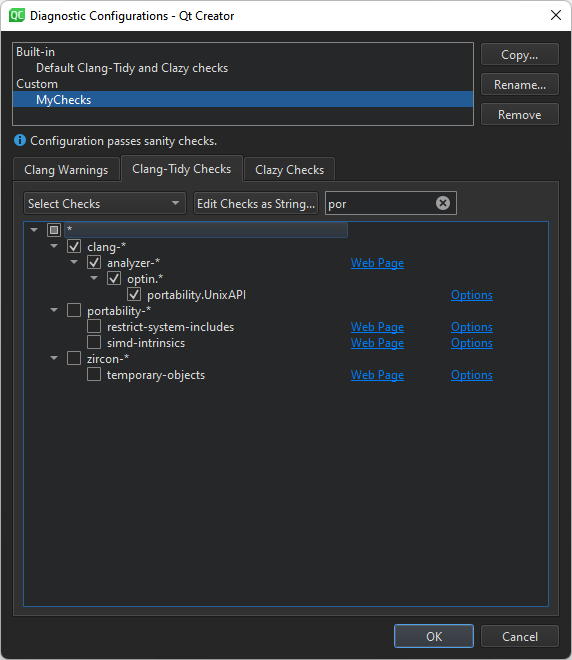
有关可用检查器的更多信息,请参阅Clang 静态分析器文档。
- 若要以纯文本形式编辑所选检查项,请选择“Edit Checks as String ”。
- 在“Clazy Checks ”选项卡中,选择要执行的 Clazy 检查级别。
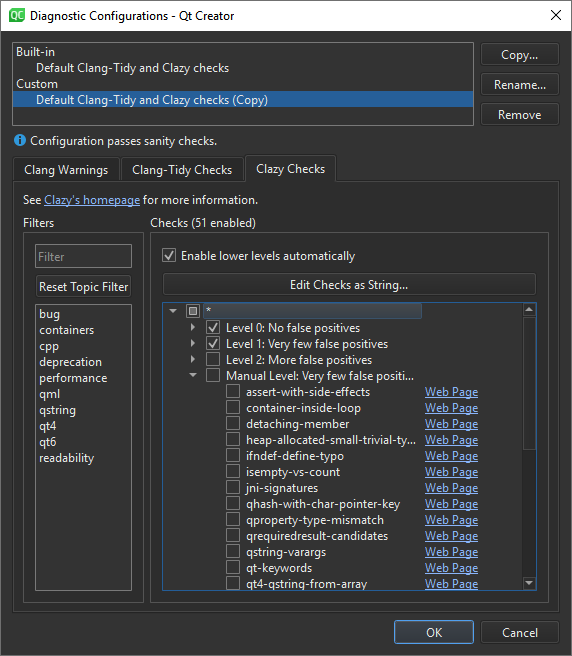
- 要以纯文本形式编辑所选检查,请选择“Edit Checks as String ”(检查配置)。
- 在“Filters ”字段中,选择主题,以便在“Checks ”字段中仅查看与这些领域相关的检查。要过滤所选领域的检查,请在“Filter by name ”字段中输入字符串。
- 若要再次查看所有检查项,请选择“Reset Topic Filter ”。
- 若要在线查看有关检查的更多信息,请选择其旁边的“Web Page ”链接。
选择 Clazy 检查级别
Clazy 检查分为 0 到 3 级。0 级的检查非常稳定,几乎不会出现误报,而 3 级的检查尚处于实验阶段。您可以为每个级别选择要执行的检查。若要自动包含较低级别的检查,请选择“Enable lower levels automatically ”。
创建 Clang-Tidy 配置文件
Clang-Tidy 会从源文件最近的父目录中的 .clang-tidy 文件中读取每个源文件的配置。如果任何配置选项有对应的命令行选项,则以命令行选项为准。可通过 `-dump-config` 查看当前生效的配置。
Qt Creator 会根据您选择的检查项为您自动生成配置。若要以文件格式保存这些检查项,您可以按以下方式创建一个 .clang-tidy 文件:
- 选择“Edit Checks as String ”,并复制该字段中的内容。
- 将 `
clang-tidy -dump-config` 的输出通过管道重定向到名为 `.clang-tidy` 的文件中。例如:clang-tidy -checks=-*,bugprone-*,cppcoreguidelines-avoid-* -dump-config > .clang-tidy - 将 .clang-tidy 文件移动到源代码的父目录中。
若后续需要使用“Qt Creator ”添加更多检查项,请将 .clang-tidy 文件中的检查项复制到Edit Checks as String 字段中,选择其他检查项,然后将该字段的内容复制粘贴回 .clang-tidy 文件中。
另请参阅 《使用 Clang-Tidy 和 Clazy 分析代码》、《指定 Clang 工具设置》以及《设置 Clang 工具的全局首选项》。
Copyright © The Qt Company Ltd. and other contributors. Documentation contributions included herein are the copyrights of their respective owners. The documentation provided herein is licensed under the terms of the GNU Free Documentation License version 1.3 as published by the Free Software Foundation. Qt and respective logos are trademarks of The Qt Company Ltd in Finland and/or other countries worldwide. All other trademarks are property of their respective owners.
