
指定 Clang 工具设置
要设置当前项目运行 Clang-Tidy 和 Clazy 检查:
- 转到“Projects ” > “Project Settings ” > “Clang Tools ”。
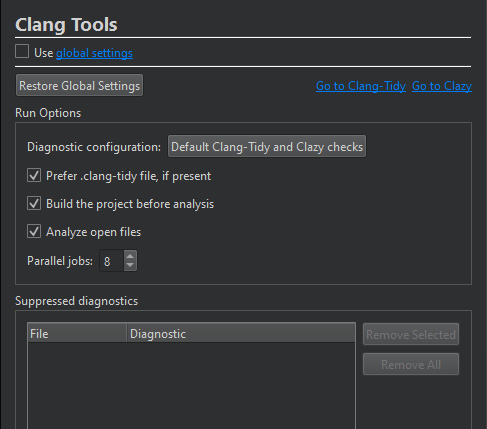
- 清除“Use global settings ”。
- 为该项目设置首选项。
- 在“Suppressed diagnostics ”中,您可以查看项目的抑制列表,并从中移除诊断项。
要恢复全局设置,请选择“Restore Global Settings ”。要查看和修改全局设置,请选择“Use global settings ”中的链接。
要打开“Clang-Tidy ”视图,请选择Go to Clang-Tidy 。要打开“Clazy ”视图,请选择Go to Clazy 。
另请参阅 “使用 Clang-Tidy 和 Clazy 分析代码”、“配置 Clang 诊断”以及“设置 Clang 工具的全局首选项”。
Copyright © The Qt Company Ltd. and other contributors. Documentation contributions included herein are the copyrights of their respective owners. The documentation provided herein is licensed under the terms of the GNU Free Documentation License version 1.3 as published by the Free Software Foundation. Qt and respective logos are trademarks of The Qt Company Ltd in Finland and/or other countries worldwide. All other trademarks are property of their respective owners.
