
Valgrind Callgrind
您可以在项目的运行设置中,为所有项目统一设置Valgrind首选项,也可以为每个项目单独设置。
要设置 Valgrind 的全局首选项,请选择“Preferences ” > “Analyzer ” > “Valgrind ”。在“Callgrind Profiling Options ”中设置 Callgrind 首选项。
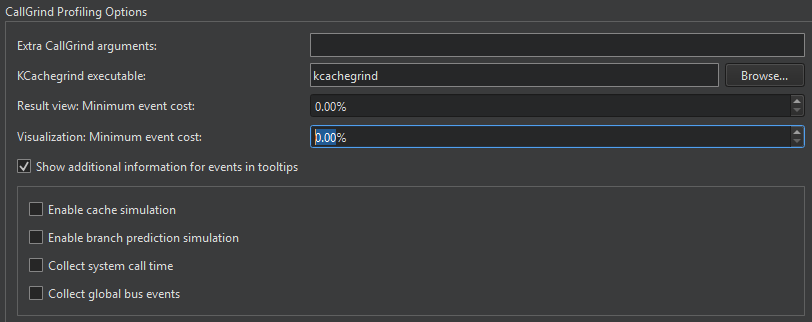
在“KCachegrind executable ”字段中,输入要启动的 KCachegrind 可执行文件的路径。
在“Extra Callgrind arguments ”字段中,指定用于启动可执行文件的附加参数。
在“Result view: Minimum event cost ”和“Visualization: Minimum event cost ”字段中,限制分析器呈现和可视化的结果数量,以提高分析器的性能。
要在工具提示中显示有关事件的更多信息,请选择“Show additional information for events in tooltips ”。
要收集有关系统调用时间的信息,请选择“Collect system call time ”。要收集已执行的“Ge ”事件类型的全局总线事件的数量,请选择“Collect global bus events ”。
启用完整缓存仿真
默认情况下,仅统计指令读取访问(Ir)。要完全模拟缓存,请选择“Enable cache simulation ”。这将启用以下额外的事件计数器:
- 指令读取时的缓存未命中(I1mr/I2mr)
- 数据读取访问 (Dr) 及相关缓存未命中 (D1mr/D2mr)
- 数据写访问(Dw)及相关缓存未命中(D1mw/D2mw)
启用分支预测模拟
要启用以下附加事件计数器,请选择“Enable branch prediction simulation ”:
- 已执行的条件分支数量及相关预测器未命中(Bc/Bcm)
- 已执行的间接跳转及其相关的跳转地址预测器未命中(Bi/Bim)
另请参阅 “使用 Memcheck 检测内存泄漏”、“分离视图”、“分析函数执行”、“在外部应用程序上运行 Valgrind 工具”、“为项目指定 Valgrind 设置”以及“Valgrind Memcheck”。
Copyright © The Qt Company Ltd. and other contributors. Documentation contributions included herein are the copyrights of their respective owners. The documentation provided herein is licensed under the terms of the GNU Free Documentation License version 1.3 as published by the Free Software Foundation. Qt and respective logos are trademarks of The Qt Company Ltd in Finland and/or other countries worldwide. All other trademarks are property of their respective owners.
