
查看调用堆栈跟踪
当正在调试的应用程序被中断时,Qt Creator 会以调用堆栈跟踪的形式显示导致当前位置的嵌套函数调用。该堆栈跟踪由调用堆栈帧构成,每个帧代表一个特定函数。对于每个函数,Qt Creator 都会尝试检索对应源文件的文件名和行号。这些数据显示在“Stack ”视图中。
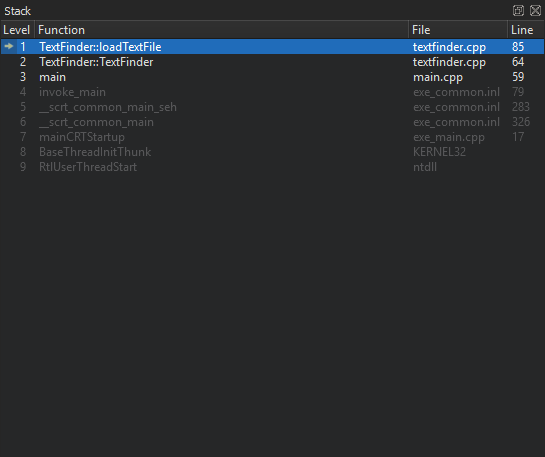
由于导致当前位置的调用堆栈可能源自或经过没有调试信息的代码,因此并非所有堆栈帧都有相应的源代码位置。没有相应源代码位置的堆栈帧将显示为灰色。
如果您选择了一个具有已知源代码位置的栈帧,文本编辑器将跳转到相应位置,并更新“局部变量”和“表达式”视图,使其看起来好像应用程序是在进入该函数之前被中断的。
加载 QML 堆栈
若要查明是哪个 QML 文件导致了Qt Quick 应用程序崩溃,请在“Stack ”视图的上下文菜单中选择“Load QML Stack ”。调试器会尝试从已暂停的可执行文件中检索 JavaScript 堆栈,并在找到相关帧时将其添加到 C++ 帧之前。您可以选择 QML 堆栈中的某个帧,在编辑器中打开相应的 QML 文件。
Copyright © The Qt Company Ltd. and other contributors. Documentation contributions included herein are the copyrights of their respective owners. The documentation provided herein is licensed under the terms of the GNU Free Documentation License version 1.3 as published by the Free Software Foundation. Qt and respective logos are trademarks of The Qt Company Ltd in Finland and/or other countries worldwide. All other trademarks are property of their respective owners.
