
查看和编辑寄存器状态
机器码由机器语言指令组成,这些指令使 CPU 对 CPU 寄存器或内存中的数据单元执行诸如加载或存储等操作。
“Registers ”视图显示通用和专用 CPU 寄存器的当前状态。可用的寄存器取决于 CPU 类型。
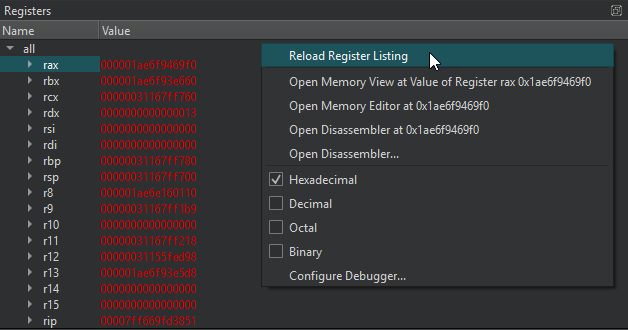
当应用程序停止时,您可以查看寄存器值。双击寄存器值即可进行编辑。
最近发生变化的寄存器值会以红色突出显示。空寄存器值和前导零会显示为灰色。
右键单击列标题可显示或隐藏视图中的“Name ”和“Value ”列。
右键单击视图可选择以下操作:
默认情况下,“Registers ”视图处于隐藏状态。要显示该视图,请在调试器工具栏的“Views ”中选择它。
检查内存
您可以以多种格式检查内存,而不受应用程序数据类型的限制。
要打开内存编辑器,请在“Registers ”视图中选择一个值,然后在上下文菜单中选择“Open Memory Editor at <value> ”或“Open Memory View at <value> ”:
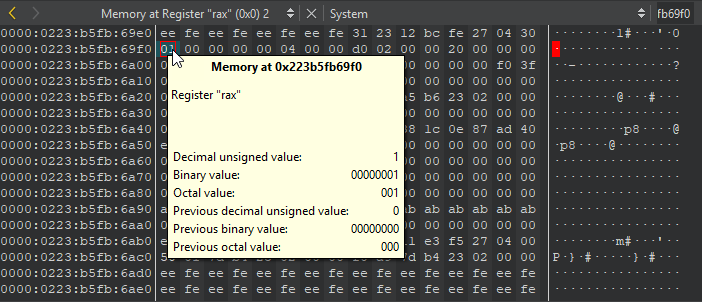
将鼠标指针悬停在某个值上,即可通过工具提示查看详细信息。
右键单击某个值可:
- 以 ASCII 或十六进制格式复制所选内容。
- 在所选内容上设置数据断点。
- 跳转到当前数据视图或新数据视图中选定的地址。
Copyright © The Qt Company Ltd. and other contributors. Documentation contributions included herein are the copyrights of their respective owners. The documentation provided herein is licensed under the terms of the GNU Free Documentation License version 1.3 as published by the Free Software Foundation. Qt and respective logos are trademarks of The Qt Company Ltd in Finland and/or other countries worldwide. All other trademarks are property of their respective owners.
